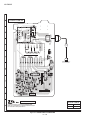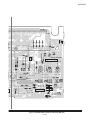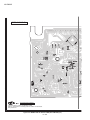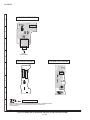
1
XL-DK255
[2] Disassembly
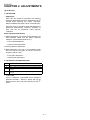
Caution on disassembly
Follow the below-mentioned notes when disassembling
the unit and reassembling it, to keep it safe and ensure
excellent performance:
1) Take cassette tape and compact disc out of the unit.
2) Be sure to remove the power supply plug from the
wall outlet before starting to disassemble the unit.
3) Take off nylon bands or wire holders where they
need to be removed when disassembling the unit.
After servicing the unit, be sure to rearrange the
leads where they were before disassembling.
4) Take sufficient care on static electricity of integrated
circuits and other circuits when servicing.
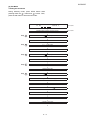
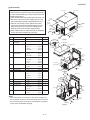
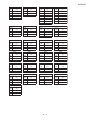
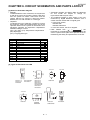
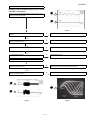
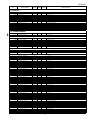
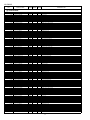
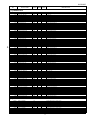
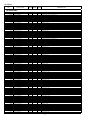
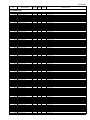
STEP
REMOVAL
PROCEDURE
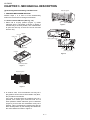
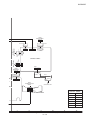
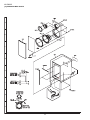
Top Cabinet
(A1)x2
3x12mm
(B1)x2
3x10mm
(A1)x2
3x12mm
Side Panel
(Left)
Side Panel
(Right)
(A1)x2
3x12mm
(B1)x2
3x10mm
Rear Panel
(B1)x2
3x10mm
FIGURE
1
Top Cabinet
1. Screw ............................ (A1) X 6
1
2
Side Panel
(Left/Right)
1. Screw ............................ (B1) X 8
1
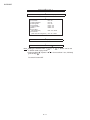
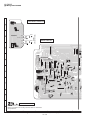
CD Changer unit
1. Screw ............................(C1) X 2
3
Front Panel
(B1)x2
3x10mm
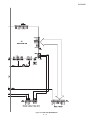
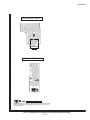
Figure 1
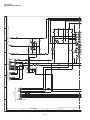
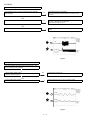
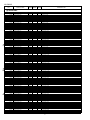
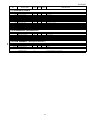
(C4)x2 (C3)x2
CD MP3 PWB
CD Changer Unit
2
2. Hook ..............................(C2) X 2
(C3)x1
3. Socket ...........................(C3) X 3
Front Panel
4. Flat Cable ......................(C4) X 2
4
Rear Panel with
Speaker PWB
1. Screw ............................(D1) X 4
PULL
2
(C1)x1
3x10mm
Hook
(C2)x1
2. Socket ...........................(D2) X 1
3. Flat Cable ......................(D3) X 1
Hook
(C2)x1
PULL
5
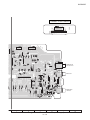
Front Panel
1. Screw ............................ (E1) X 3
3
2. Flat Cable ...................... (E2) X 2
(C1)x1
3x10mm
3. Socket ........................... (E3) X 1
4. Hook .............................. (E4) X 2
6
Main PWB
1. Screw ............................ (F1) X 3
Rear Panel
3
Speaker PWB
(D3)x1
2. Socket ........................... (F2) X 2
7
Power PWB
1. Screw ............................(G1) X 4
3
8
Speaker PWB
1. Screw ............................(H1) X 2
4
9
Display PWB
1. Knob ...............................(J1) X 1
5
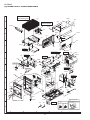
(D1)x4
3x10mm
(D2)x1
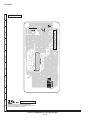
Figure 2
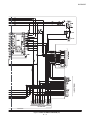
(E1)x1
3x6mm
(F1)x1
3x6mm
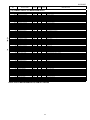
2. Nut ..................................(J2) X 1
3. Washer ...........................(J3) X 1
4. Screw .............................(J4) X 6
10
USB PWB / SUB PWB
1. Screw ............................ (K1) X 2
5
11
Jack PWB
1. Screw ............................ (L1) X 1
5
12
Re-Flash PWB
1. Screw ........................... (M1) X 1
6
13
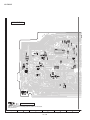
CD MP3 PWB
1. Screw ............................(N1) X 3
7
2. Flat Cable ......................(N2) X 2
(E4)x1
PULL
Front panel
(E3)x1
(F2)x1
(G1)x4
4x6mm
(E2)x2
Power PWB
3. Socket ...........................(N3) X 1
14
CD Mechanism
1. Screw ............................ (P1) X 4
7
2. Screw ............................ (P2) X 4
8
Hook
(E4)x1
PULL
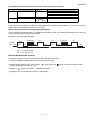
Note:
After removing the connector for the optical pickup from
the connector, wrap the conductive aluminium foil around
the front end of the connector so as to protect the optical
pickup from electrostatic damage.
3–2
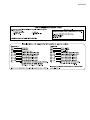
(F2)x1
Main PWB
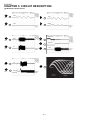
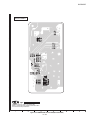
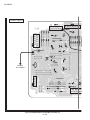
Figure 3
(F1)x2
3x10mm
(E1)x2
3x10mm