1
MODEL
AR-156
DIGITAL LASER COPIER
OPERATION MANUAL
Page
• GETTING STARTED
3
• MAKING COPIES
12
• SPECIAL FUNCTIONS
20
• SUPPLIES AND
USER MAINTENANCE
23
• COPIER TROUBLE?
27
• APPENDIX
36
• OPTIONAL EQUIPMENT
40
FOR YOUR RECORDS ...
To protect against loss or theft, record and retain for reference the
copier’s serial number located on the back of the unit.
Model Number
Serial Number
Date of Purchase
Place of Purchase
Authorized Sharp Copier
Service Department Number
CONTENTS
1
GETTING STARTED
INTRODUCTION 3
CAUTIONS 4
MAIN FEATURES 5
PART NAMES 6
OPERATION PANEL
7
COPIER INSTALLATION 8
CAUTIONS ON HANDLING 9
LOADING COPY PAPER 10
2
MAKING COPIES
NORMAL COPYING 12
– Stream feeding mode 16
EXPOSURE ADJUSTMENT/PHOTO COPYING
REDUCTION/ENLARGEMENT/ZOOM 17
BYPASS FEED (including special paper) 18
3
16
SPECIAL FUNCTIONS
DESCRIPTION OF SPECIAL FUNCTIONS 20
TONER SAVE MODE 20
USER PROGRAMS (power save modes, auto clear time,
stream feeding mode) 21
– Setting the power save modes, auto clear time, and
stream feeding mode 21
DISPLAYING TOTAL NUMBER OF COPIES
22
1
CONTENTS
4
SUPPLIES AND USER MAINTENANCE
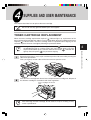
TONER CARTRIDGE REPLACEMENT
–
Toner cartridge life
25
USER MAINTENANCE
5
23
25
–
Cabinet
25
–
Original table and original cover
–
Transfer charger
–
When copier is not in use
25
26
26
COPIER TROUBLE?
MISFEED REMOVAL
27
– A Misfeed in the paper feed area
– B Misfeed in the fusing area
28
– C Misfeed in the transport area
– D Misfeed in the RSPF
30
DEVELOPER REQUIRED
32
MAINTENANCE REQUIRED
TROUBLESHOOTING
28
29
32
33
STATUS INDICATORS
34
AUTOMATIC EXPOSURE ADJUSTMENT
6
APPENDIX
SPECIFICATIONS
SUPPLIES
36
38
– Types and sizes of copy paper
7
38
OPTIONAL EQUIPMENT
SYSTEM CONFIGURATION
40
250-SHEET PAPER FEED UNIT (AR-DE9)
– Part names
41
– Loading copy paper
– Misfeed removal
– Specifications
INDEX
2
35
41
41
42
41
GETTING STARTED
This chapter provides basic information for using the copier.
1
INTRODUCTION
Getting started
This copier has been designed to provide intuitive operating ease while requiring a minimum
amount of space. To get full use of all copier features, be sure to familiarize yourself with this
manual and the copier.
For quick reference during copier use, keep this manual in a handy location.
This copier can also be used as a laser printer if an optional printer expansion
kit is installed. This manual describes only the copier features. For description
of the printer features, see their separate manual.
Conventions used in this manual
In this manual, the following icons are used to provide the user with information pertinent to the
use of the copier.
Warns the user that injury to the user or damage to the copier may result if the
contents of the warning are not properly followed.
Cautions the user that damage to the copier or one of its components may
result if the contents of the caution are not properly followed.
Notes provide information relevant to the copier regarding specifications,
functions, performance, operation and such, that may be useful to the user.
Indicates a letter displayed in the display.
3
CAUTIONS
Follow the cautions below when using this copier.
●
The fusing area is hot. Exercise care in this area when removing misfed paper.
Do not look directly at the light source. Doing so may damage your eyes.
● Do not switch the copier rapidly on and off. After turning the copier off, wait 10
to 15 seconds before turning it back on.
● Copier power must be turned off before installing any supplies.
●
1
Getting started
.● Place the copier on a firm, level surface.
●
Do not install the copier in a humid or dusty location.
●
When the copier is not used for a long time, for example, for consecutive
holidays, turn the power switch off and remove the power cord from the outlet.
●
When moving the copier, be sure to turn the power switch off and remove the
power cord from the outlet.
●
Do not cover the copier with a dust cover, cloth or plastic film while the power
is on. Doing so may prevent heat radiation, damaging the copier.
●
Use of controls or adjustments or performance of procedures other than those
specified herein may result in hazardous radiation exposure.
SAFETY PRECAUTIONS
This Digital Copier is rated Class 1 and complies with 21 CFR 1040.10 and 1040.11 of the
CDRH standards. This means that the copier does not produce hazardous laser radiation.
For your safety, observe the precautions below.
● Do not remove the cabinet, operation panel or any other covers.
● The copier’s exterior covers contain several safety interlock switches. Do not bypass
any safety interlock by inserting wedges or other items into switch slots.
4
MAIN FEATURES
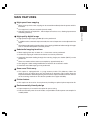
High-speed laser copying
Since warm-up time is zero, copying can be started immediately after the power switch is
turned on.
●
First-copy time is only 9.6 seconds (normal mode).
●
Copying speed is 15 copies/min., which adapts to business use, allowing improvement
of working efficiency.
1
Getting started
●
High-quality digital image
●
High-quality image copying at 600 dpi can be performed.
●
In addition to the automatic exposure mode, the manual exposure can be adjusted in five
steps.
●
The photo mode copying function allows clear copying of delicate halftone original images
such as monochrome photos and color photos.
Substantial copying functions
●
Zoom copying from 50% to 200% in 1% increments can be performed.
●
Continuous copying of maximum 99 sheets can also be performed.
●
Automatic document feeding through the reversing single pass feeder (RSPF) can be
performed.
●
Toner save mode reduces toner consumption by approximately 10%.
●
User programs allow setting/modification of functions for customer’s needs.
●
Automatic two-sided copying can be performed.
Scan once/ Print many
●
This copier is equipped with a 1-page memory buffer. This Memory allows the
copier to scan an original once only and make up to 99 copies. This feature allows for
improved workflow, reduced operating noise from the copier and reduced wear and tear
on the scanning mechanism. This feature provides for a higher reliability.
Printer feature
●
This copier can be used as a laser printer by installing an optional printer expansion kit.
Environmentally friendly design
●
Paper output tray is housed in the copier for space saving.
●
Preheat and auto power shut-off modes are provided to reduce power consumption in
standby mode.
5
Original guides
RSPF exit area
PART NAMES
Document
feeder tray
Original table
Feeding roller cover
Original cover
1
Getting started
Operation
panel
Side cover
Bypass tray
Bypass tray guides
Paper tray
Front cover
Side cover
open button
Handle
Cover for optional printer interface
* A printer expansion kit is optional.
Paper output
tray
Paper output tray
extension
Power cord socket
Toner cartridge lock release
lever
Handle
Power switch
Toner cartridge
Transfer charger
Fusing unit
Charger cleaner
release lever
6
Photoconductive drum
OPERATION PANEL
1
Getting started
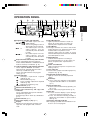
Original to copy key and indicators
: Two-sided copies from onesided originals.
Turn on Long Edge or Turn on
Short Edge can be selected.
: Two-sided copies from twosided originals. (Can be
selected only when the RSPF
is used.)
: One-sided copies from twosided originals. (Can be
selected only when the RSPF
is used.)
Exposure mode selector key and indicators
Use to sequentially select the exposure
modes: AUTO, MANUAL or PHOTO. Selected
mode is shown by a lit indicator. (p. 16)
Light and dark keys and exposure indicators
Use to adjust the MANUAL or PHOTO
exposure level. Selected exposure level is
shown by a lit indicator. (p.16)
Use to start and terminate user program
setting. (p. 21)
Alarm indicators
: Developer replacement required
indicator (p. 32)
: Misfeed indicator (p. 27)
: Toner cartridge replacement required
indicator (p. 23)
: Maintenance indicator (p. 32)
RSPF indicator (p. 13)
RSPF misfeed indicator (p. 30)
Copy ratio selector key and copy ratio
indicators
Use to sequentially select preset reduction/
enlargement copy ratios.
Selected copy ratio is shown by a lit indicator.
(p. 17)
Zoom indicator (p. 17)
Copy ratio display (%) key (p. 17)
Display
Displays the specified copy quantity, zoom
copy ratio, user program code, and error
code.
ON LINE indicator
Lights up when the machine is used as a
printer. To use the copier as a printer, an
optional printer expansion kit is needed.
ON LINE key
Changes between the on-line and off-line
modes when the PCL expansion kit has been
installed and a PCL printer is used.
Changes modes from the off-line to on-line
when the GDI expansion kit has been installed
and a GDI printer is used.
DATA indicator
Indicates that the printer is receiving or
processing print data. To use the copier as a
printer, an optional PCL expansion kit is
needed.
Power save indicator
Lights up when the copier is in a power save
mode. (p. 20, 21)
Tray select key
Use to select a paper feed station (paper tray
or bypass tray). (p. 19)
Paper feed location indicators
Light up to show the selected paper feed
station.
Zoom keys
● Use to select any reduction or enlargement
copy ratio from 50 to 200% in 1% increments.
(p. 17)
Copy quantity keys
● Use to select the desired copy quantity (1 to
99). (p. 15)
● Use to make user program entries. (p. 21)
Clear key
● Press to clear the display, or press during a
copy run to terminate copying. (p. 15)
● Press and hold down during standby to
display the total number of copies made to
date. (p. 22)
Print key and ready indicator
● Copying is possible when the indicator is on.
● Use to set a user program.
7
COPIER INSTALLATION
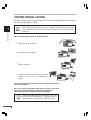
Improper installation may damage the copier. Please note the following during initial installation
and whenever the copier is moved.
If the copier is moved from a cool place to a warm place, condensation may
form inside the copier. Operation in this condition will cause poor copy quality
and malfunctions. Leave the copier at room temperature for at least 2 hours
before use.
1
Getting started
Do not install your copier in areas that are:
●
damp, humid, or very dusty
●
exposed to direct sunlight
●
poorly ventilated
●
subject to extreme temperature or humidity
changes, e.g., near an air conditioner or
heater.
The copier should be installed near an accessible power outlet
for easy connection.
Be sure to connect the power cord only to a power outlet that
meets the specified voltage and current requirements.
Also make certain the outlet is properly grounded.
Connect the copier to a power outlet which is not used
for other electric appliances. If a lighting fixture is
connected to the same outlet, the light may flicker.
8
COPIER INSTALLATION
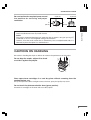
Be sure to allow the required space around
the machine for servicing and proper
ventilation.
8"(20 cm)
4"
(10 cm)
8"(20 cm)
4"
(10 cm)
1
Getting started
A small amount of ozone is produced within the copier during operation. The emission
level is insufficient to cause any health hazard.
NOTE:
The present recommended long term exposure limit for ozone is 0.1 ppm (0.2 mg/m3)
calculated as an 8 hr. time-weighted average concentration.
However, since the small amount that is emitted may have an objectionable odor, it is
advisable to place the copier in a ventilated area.
CAUTIONS ON HANDLING
Be careful in handling the copier as follows to maintain the performance of this copier.
Do not drop the copier, subject it to shock
or strike it against any object.
Store spare toner cartridges in a cool dry place without removing from the
package before use.
If they are exposed to direct sunlight or excessive heat, poor print quality may result.
Do not touch the photoconductive drum (green portion).
Scratches or smudges on the drum will cause dirty copies.
9
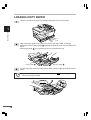
LOADING COPY PAPER
Raise the handle of the paper tray and pull the paper tray out until it stops.
1
Getting started
Adjust the paper guides on the paper tray to the copy paper width and length.
Squeeze the lever of paper guide
and slide the guide to match with the width of the
paper.
to the appropriate slot as marked on the tray.
Move paper guide
Paper guide B
Paper guide A
Fan the copy paper and insert it into the tray. Make sure the edges go under the corner
hooks.
Do not load paper above the maximum height line (
will cause a paper misfeed.
10
). Exceeding the line
LOADING COPY PAPER
Gently push the paper tray back into the copier.
After loading copy paper, to cancel the blinking “P” without restarting copying,
press the clear ( ) key. The “P” in the display will go out and the ready (
)
indicator will light up.
1
Getting started
11
MAKING COPIES
This chapter describes basic copying functions and some other copying functions using the
bypass tray.
NORMAL COPYING
2
Making copies
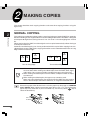
This copier has two document input stations -reversing single pass feeder (RSPF) for automatic
document feeding and an original table for manual handling of documents. The RSPF is designed
to hold up to 30 originals measuring from 5-1/2" x 8-1/2" to 10" x 14" and weighing from 14 to 23
lbs.
When copying from the RSPF, two-side originals can be copied automatically without having to
manually turn them over.
Automatic two-sided copying can also be performed with this copier. When copying from onesided originals to two-sided copies, copying orientation can be selected between Turn on Long
Edge and Turn on Short Edge.
A A
A
A
Turn on Long Edge
A
A
A
A
Turn on Short Edge
●
When making two-sided copies from the original table, the copy paper size
must be letter. When making two-sided copies from the RSPF, letter, legal,
and invoice sizes can be used. Non-standard size paper cannot be used.
● When making two-sided copies from the RSPF, a multiple number of copies
cannot be set.
● When making two-sided copies, the bypass tray cannot be used.
● When using two-sided invoice size originals from the RSPF, be sure to place
them in the landscape orientation. Otherwise, an original misfeed will occur.
Ensure that paper of the desired size is set in the paper tray. See page 10, LOADING
COPY PAPER. When copying onto paper larger than 8-1/2" x 11" size, pull out the
paper output tray extension. If you use another tray, use the tray select (
) key to
select the desired tray.
12
NORMAL COPYING
Turn the power switch on.
The ready (
) indicator will light up.
●
The copier will enter a power save mode once the set time has elapsed without
any copier operation after the last copy of a run is made or power is turned
on.
The settings of the power save modes can be modified. See page 21, USER
PROGRAMS.
● The copier will return to the initial settings a preset amount of time after the
last copy is made. The preset amount of time (auto clear time) can be changed.
See page 21, USER PROGRAMS.
2
Making copies
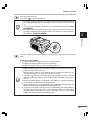
Place the original(s) face up in the document feeder tray or face down on the original
table.
A. When using the RSPF:
(1) Make sure that no original is left on the original table.
(2) Adjust the original guides to the size of originals.
(3) Set the originals face up in the document feeder tray.
●
Before feeding originals in the document feeder tray, be sure to remove any
staples or paper clips from them.
● Before placing curled or wavy originals into the document feeding tray, be
sure to flatten them. If not, original misfeeds may result.
● The RSPF ( ) indicator on the operation panel will light up. If this indicator
does not light up, the originals are not properly set or the RSPF is not properly
closed.
● Badly damaged originals may misfeed in the RSPF. It is recommended that
such originals be copied from the original table.
● Special originals such as transparency film should not be fed through the
RSPF, but should be placed directly on the original table.
● Image loss (max. 5/32" (4mm)) can occur at the leading and trailing edges of
the copies. Also image loss (max. 11/64" (4.5mm) in total) can occur along
the other edges of the copies. It can be 15/64" (6mm) (max.) at the trailing
edge of the second copy of two-sided copying.
13
NORMAL COPYING
Original face up
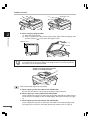
B. When using the original table:
(1) Open the original cover.
(2) Place an original face down on the original table. Align it with the original scale
and the centering ( ) mark. Close the original cover.
2
Making copies
Original scale
mark
When copying a book or an original which has been folded or a crumpled original,
press down the original cover lightly. If the original cover is not securely closed,
the copies may be striped or blurred.
A book, an original which has been
folded, or a crumpled original
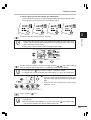
Select the desired original to copy mode.
A. When copying in the one-sided to one-sided mode:
Ensure that no indicator is lit among the original to copy indicators.
B. When copying in a one-sided to two-sided mode:
Use the original to copy key to select the desired one-sided to two-sided copying
mode (Turn on Long Edge or Turn on Short Edge). See the illustrations on page
12.
C. When copying in the two-sided to two-sided mode:
Use the original to copy key to select the two-sided to two-sided copying mode.
The originals must be set in the RSPF before this mode can be set (step 3).
14
NORMAL COPYING
D. When copying in the two-sided to one-sided mode:
Use the original to copy key to select the two-sided to one-sided copying mode.
The originals must have been set in the RSPF in step 3.
A
B
C
D
2
Ensure that the desired paper tray is selected.
Making copies
●
Paper sizes that can be used in the duplex copy mode are letter, legal, and
invoice. (When copying from the original table in the duplex copy mode, only
letter size paper can be used.)
● The bypass tray cannot be used in the duplex copy mode.
Set the number of copies using the two copy quantity ( ,
) keys when copying
from the original table or copying in a 1-sided copy mode from the RSPF.
●
Press the clear (
●
A single copy can be made with the initial setting, i.e., when “0” is displayed.
Tens digit
Press the print (
) key to clear an entry if a mistake is made.
●
Press the right copy quantity key to set the units
digit from 0 to 9. This key will not change the tens
digit.
●
Press the left copy quantity key to set the tens
digit from 1 to 9.
Units digit
) key.
●
To display the number of copies made in a continuous run, press the left copy
quantity key.
●
To stop copying in the middle of a run, press the clear (
stop and the number in the display will be reset to “0”.
) key. Copying will
15
NORMAL COPYING
When making two-sided copies from the original table, place the second original on
the original table and press the print (
) key.
2
●
Making copies
To cancel two-sided copying after scanning the first original, press the clear
( ) key.
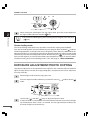
Stream feeding mode
The stream feeding mode allows easy operation of continuous copying from the RSPF.
If the stream feeding mode has been enabled using user program No.4, the RSPF ( ) indicator
will blink approximately 5 seconds after the last original has been fed by the RSPF. While this
indicator is blinking, any new originals placed in the document feeder tray will be fed and copied
automatically. If the stream feeding mode has been disabled, the print (
) key must be pressed
each time the originals are set even immediately after completion of a copy run from the RSPF.
The default setting of the stream feeding mode is “ON”. See page 21, USER PROGRAMS.
EXPOSURE ADJUSTMENT/PHOTO COPYING
Copy density adjustment is not required for most originals in the automatic exposure mode. To
adjust the copy density manually or to copy photographs, the exposure level can be adjusted in
five steps manually.
Set the original and check the copy paper size.
Press the exposure mode selector key to select the manual (
mode.
) mode or photo (
)
Use the light ( ) and dark ( ) keys to adjust the exposure level.
If exposure level 2 is selected, the two left-handmost indicators for that level will light
up simultaneously. Also, if level 4 is selected, the two right-handmost indicators for
that level will light up simultaneously.
16
NORMAL COPYING
Set the number of copies using the copy quantity (
(
) key.
,
) keys and press the print
2
Making copies
REDUCTION/ENLARGEMENT/ZOOM
Three preset reduction ratios and two enlargement ratios can be selected. The zoom function
enables copy ratio selection from 50% to 200% in 1% increments.
Set the original and check the copy paper size.
Use the copy ratio selector key and/or zoom (
ratio.
,
) keys to select the desired copy
●
To verify a zoom setting without changing the zoom ratio, press and hold
down the copy ratio display (%) key. When the key is released, the display will
return to the copy quantity display.
● To reset the ratio to 100%, press the copy ratio selector key repeatedly until
the 100% indicator lights up.
To select a preset copy ratio:
Preset reduction and enlargement ratios
are: 50%, 64%, 78%, 129%, and 200%
To select a zoom ratio:
When a zoom (
or
) key is pressed,
the ZOOM indicator will light up and the
zoom ratio will be displayed in the display.
To decrease or increase the zoom ratio rapidly, press and hold down the
or
key. However, the value will stop at the preset reduction or enlargement
ratios. To move beyond these ratios, release the key and then press and hold it
down again.
Set the number of copies using the copy quantity (
(
) key.
,
) keys and press the print
17
BYPASS FEED (including special paper)
The bypass tray can automatically feed up to 50 sheets of standard copy paper and can also
feed special papers such as transparency film and labels one sheet at a time. Copy paper
measuring from 3-1/2" x 5-1/2" to 8-1/2" x 14" and in the weight range of 14 to 34.5 lbs. can be
used in this tray. (For paper weighing from 28 to 34.5 lbs., 8-1/2" x 11" is the maximum size.)
Place the original(s) face up in the document feeder tray or face down on the original
table.
2
Making copies
The original image must be smaller than the paper or media for copying.
If the original image is bigger than the paper or media, this may cause smudges
on the edges of the copies.
Open the bypass tray and extend the tray.
To close the bypass tray, perform
step1 and then step 2 in the
illustration and push the round
projections at the right of the tray
until the tray clicks into place.
Set the paper guides to the copy paper width. Insert the copy paper (print face down)
all the way into the bypass tray.
●
Paper must be fed narrow side into the feed slot.
Transparency film, labels, and other special purpose papers must be fed
individually.
● When copying onto transparency film, remove each copy promptly. Do not let
copies stack up.
● When loading an envelope, make sure that it is straight and flat.
●
18
BYPASS FEED
Print face
Press the tray select (
) key to select the bypass tray. Set the number of copies if
using standard copy paper. Press the print (
) key.
2
Making copies
19
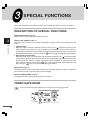
SPECIAL FUNCTIONS
This chapter describes the special functions of this copier. Use these functions as needed.
DESCRIPTION OF SPECIAL FUNCTIONS
Toner save mode (page 20)
Reduces toner consumption by approximately 10%.
3
Power save modes (page 21)
Special functions
The copier has two power save modes of operation: preheat mode and auto power shut-off
mode.
●
Preheat mode
When the copier enters the preheat mode, the power save ( ) indicator will light up and
other indicators will remain on or off as before. In this condition, the fuser in the copier is
maintained at a lower heat level, thereby saving power. To copy from the preheat mode, make
desired copier selections and press the print (
) key using the normal copying procedure.
●
Auto power shut-off mode
When the copier enters the auto power shut-off mode, the power save ( ) indicator will light
up and other indicators will go out. The auto power shut-off mode saves more power than the
preheat mode but requires a longer time before starting copying. To copy from the auto
power shut-off mode, press the print (
) key. Then make desired copier selections and
press the print (
) key using the normal copying procedure.
Auto clear (page 21)
The copier returns to the initial settings a preset amount of time after the last copy is made. This
preset amount of time (auto clear time) can be changed.
Stream feeding mode (page 21)
For description of the stream feeding mode, see page 16.
TONER SAVE MODE
Press the exposure mode selector key to select the manual (
20
) mode.
TONER SAVE MODE
Press and hold down the exposure mode selector key for approximately 5 seconds.
The manual (
) indicator will go out and the photo ( ) indicator will begin to blink.
The exposure indicator marked “5” will light up, indicating the standard toner mode is
active.
To enter the toner save mode, press the light ( ) key.
The exposure indicator marked “1” will light up, indicating the toner save mode is
selected.
3
Special functions
Press the exposure mode selector key twice. The photo ( ) indicator will stop blinking
and the AUTO indicator will light up steadily. The toner save mode is now active.
To return to the standard mode, repeat the procedure but use the dark (
to select exposure level “5” in step 3.
) key
USER PROGRAMS (power save modes, auto clear
time, stream feeding mode)
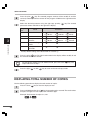
The user programs allow the parameters of certain functions to be set, changed, or canceled
as desired.
Setting the power save modes, auto clear time, and stream feeding mode
Press and hold down the light ( ) and dark ( ) keys simultaneously for more than
5 seconds until all the alarm indicators ( , ,
and ) blink and “– –” appears in
the display.
Use the left copy quantity ( ) key to select a user program number (1: auto clear
time, 2: preheat mode, 3: auto power shut-off timer, 4: stream feeding mode, 5: auto
power shut-off mode). The selected number will blink in the left side of the display.
21
USER PROGRAMS
Press the print (
) key. The entered program number will be steadily lit and the
currently selected parameter number for the program will blink on the right side of the
display.
Select the desired parameter using the right copy quantity (
parameter number will blink on the right of the display.
Program
No.
3
Mode
) key. The entered
Parameters
Special functions
1
Auto clear time
0
3
OFF
90 sec.
1
4
30 sec. * 2
120 sec. 5
60 sec.
10 sec.
2
Preheat mode
0
30 sec.
1
60 sec. * 2
90 sec.
3
Auto power shutoff timer
0
3
2 min.
30 min.
* 1
4
5 min.
60 min.
15 min.
120 min.
4
Stream feeding
mode
0
OFF
* 1
ON
5
Auto power shutoff mode
0
OFF
* 1
ON
2
5
Factory default settings are indicated with an asterisk (*).
Press the print (
) key. The right-hand number in the display will be steadily lit and
the entered value will be stored.
To change the setting or to set another mode, press the clear (
copier will return to step 2.
Press the light (
) or dark (
) key. The
) key to return to the normal copy mode.
DISPLAYING TOTAL NUMBER OF COPIES
Use the following procedure to display the total number of copies.
Press the clear (
) key to reset the display to zero.
Press and hold down the clear ( ) key for approximately 5 seconds. The total number
of copies will appear in two steps, each with three digits.
Example: Total number of copies is 1,234.
22
SUPPLIES AND USER MAINTENANCE
This chapter describes how to replace the toner cartridge .
Be sure to use only genuine SHARP parts and supplies.
TONER CARTRIDGE REPLACEMENT
When the toner cartridge replacement required ( ) indicator lights up, replacement of the
toner cartridge will be needed soon. Obtain a new cartridge. When the toner cartridge replacement
required ( ) indicator blinks, the toner cartridge must be replaced before copying can be
resumed. Replace the toner cartridge by following the procedure below.
4
Supplies and user maintenance
During a long copy run of a dark original, the ready (
) indicator may blink,
the
indicator light up, and the copier stop, even though toner is left. The
copier will feed toner up to 2 minutes and then the ready (
) indicator will
light up. Press the print (
) key to restart copying.
Ensure that the bypass tray is open and then open the side cover while pressing the
side cover open button.
Then, push gently on both sides of the front cover to open the cover.
Push the toner cartridge lock release lever and pull the toner cartridge out. Dispose of
the old toner cartridge in accordance with local regulations.
Toner cartridge lock release
lever
After removing the toner cartridge, do not shake it or tap on it. Doing so may
cause a spill of toner.
23
TONER CARTRIDGE REPLACEMENT
Remove the toner cartridge from the bag. Hold the cartridge on both sides and shake
it horizontally four or five times.
4 or 5 times
Gently insert the toner cartridge along the guides until it locks in place while pushing
the lock release lever. Pull out the shutter and remove it from the toner cartridge as
shown in the illustration.
4
Supplies and user maintenance
Close the front cover and then the side cover by pressing the round projections near
the side cover open button. The
indicator will go out and the ready (
) indicator
will light up.
When closing the covers, be sure to close the front cover securely and then
close the side cover. If the covers are closed in the wrong order, the covers
may be damaged.
24
TONER CARTRIDGE REPLACEMENT
Toner cartridge life
To find out the approximate quantity of toner remaining, follow the procedure below.
Press and hold down the light (
) and dark (
5 seconds until all the alarm indicators (
the display.
,
) keys simultaneously for more than
,
and
) blink and “– –” appears in
Press and hold down the copy ratio display ( ) key for more than 5 seconds.
The approximate quantity of toner remaining will be indicated in the display as a
percentage. (“100”, “75”, “50”, “25”, or “10” is displayed.) When the percentage is
less than 10%,
will be displayed.
●
Press the light ( ) or dark ( ) key.
All the alarm indicators will go out.
●
4
Supplies and user maintenance
USER MAINTENANCE
Proper care is essential in order to get clean, sharp copies. Be sure to take a few minutes to
regularly clean the copier.
Before cleaning, be sure to turn the power switch off and remove the power
cord from the outlet.
Do not use thinner, benzene or other volatile cleaning agents. Doing so may
cause deformation, discoloration, deterioration or malfunction.
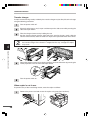
Cabinet
Wipe the cabinet with a soft, clean cloth.
Original table and original cover
Stains on the glass, cover or RSPF roller will also be copied. Wipe the glass, cover and RSPF
roller with a soft, clean cloth. If necessary, dampen the cloth with a glass cleaner.
Original table
Original cover
RSPF roller
25
USER MAINTENANCE
Transfer charger
If copies start becoming streaky or blotchy, the transfer charger may be dirty. Clean the charger
using the following procedure.
Turn the power switch off.
Ensure that the bypass tray is open and then open the side cover while pressing the
side cover open button.
Take the charger cleaner out by holding the tab.
Set the charger cleaner onto the right end of the transfer charger, gently slide the
cleaner to the left end, and then remove it. Repeat this operation two or three times.
Slide the charger cleaner from the right end to the left end along the groove of
the transfer charger. If the cleaner is stopped on the way, smudges on copies
may occur.
4
Supplies and user maintenance
Return the charger cleaner to its original position. Close the side cover by pressing the
round projections near the side cover open button.
Turn the power switch on.
When copier is not in use
To prevent entry of dust and foreign matter, store the copier as follows.
Remove the power cord and secure the copier using tape (four locations).
26
COPIER TROUBLE?
This chapter describes misfeed removal and troubleshooting.
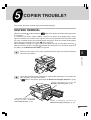
MISFEED REMOVAL
When the misfeed ( ) indicator blinks or
blinks in the display, the copier will stop because
of a misfeed.
If a misfeed occurs when using the RSPF, a number may appear in the display after a minus
sign. This indicates the number of the originals that must be returned to the document feeder
tray after a misfeed. Return the required number of originals. Then this number will disappear
when copying is resumed or the clear ( ) key is pressed.
When the RSPF misfeeds an original sheet, the copier will stop and the RSPF misfeed ( )
indicator will blink, while the misfeed ( ) indicator will remain off. For a misfeed of originals in
the RSPF, see “D Misfeed in the RSPF” on page 30.
Ensure that the bypass tray is open and then open the side cover while pressing the
side cover open button.
5
Copier trouble?
Check the misfeed location. Remove the misfed paper following the instructions for
each location in the illustration below.
If
blinks in the display, proceed to “A Misfeed in the paper feed area”. (p. 28)
If paper is misfed here, proceed to “B
Misfeed in the fusing area”. (p. 28)
If the misfed paper is seen from
this side, proceed to “C Misfeed
in the transport area”. (p. 29)
If paper is misfed here, proceed to “A
Misfeed in the paper feed area”. (p. 28)
27
MISFEED REMOVAL
A Misfeed in the paper feed area
Gently remove the misfed paper from the paper feed area as shown in the illustration.
When
blinks in the display and the misfed paper is not seen from the paper feed
area, pull out the paper tray and remove the misfed paper. If the paper cannot be
removed, proceed to “B Misfeed in the fusing area”.
The fusing unit is hot. Do not touch the fusing unit when removing misfed
paper. Doing so may cause a burn or other injury.
●
Do not touch the photoconductive drum (green portion) when removing the
misfed paper. Doing so may damage the drum and cause smudges on copies.
● If the paper has been fed through the bypass tray, do not remove the misfed
paper through the bypass tray. Toner on the paper may stain the paper
transport area, resulting in smudges on copies.
5
Copier trouble?
Close the side cover by pressing the round projections near the side cover open button.
The misfeed ( ) indicator will go out and the ready (
) indicator will light up.
B Misfeed in the fusing area
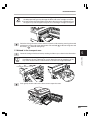
Lower the fusing unit release lever by rotating it all the way as shown in the illustration.
While you are lowering the fusing unit release lever, it will not move smoothly at
a location on the way. However, be sure to lower the lever by rotating it all the
way to the location where it will not rotate as shown in the right illustration.
Fusing unit release lever
Gently remove the misfed paper from under the fusing unit as shown in the illustration.
If the paper cannot be removed, proceed to “C Misfeed in the transport area”.
The fusing unit is hot. Do not touch the fusing unit when removing misfed
paper. Doing so may cause a burn or other injury.
28
MISFEED REMOVAL
●
Do not touch the photoconductive drum (green portion) when removing the
misfed paper. Doing so may damage the drum and cause smudges on copies.
●
Do not remove the misfed paper from above the fusing unit. Unfixed toner on
the paper may stain the paper transport area, resulting in smudges on copies.
Raise the fusing unit release lever and then close the side cover by pressing the round
projections near the side cover open button. The misfeed ( ) indicator will go out and
the ready (
) indicator will light up.
C Misfeed in the transport area
5
Lower the fusing unit release lever by rotating it all the way as shown in the illustration.
Copier trouble?
While you are lowering the fusing unit release lever, it will not move smoothly at
a location on the way. However, be sure to lower the lever by rotating it all the
way to the location where it will not rotate as shown in the right illustration.
Fusing unit release lever
Push gently on both sides of the front cover to open the cover.
29
MISFEED REMOVAL
Rotate the feeding roller in the direction of the arrow and gently remove the misfed
paper from the exit area.
Feeding roller
Raise the fusing unit release lever, close the front cover and then close the side cover
by pressing the round projections near the side cover open button. The misfeed ( )
indicator will go out and the ready (
) indicator will light up.
When closing the covers, be sure to close the front cover securely and then
close the side cover. If the covers are closed in the wrong order, the covers
may be damaged.
5
Copier trouble?
D Misfeed in the RSPF
An original misfeed may occur at one of three locations: if the misfed original is seen from the
document feeder tray, (A) in the document feeder tray; if the misfed original is not seen from
the document feeder tray, (B) in the exit area or (C) under the feeding roller. Remove the misfed
original following the instructions for each location.
(A) Open the feeding roller cover and pull the original gently to the left and out from the
document feeder tray. Close the feeding roller cover. Open and close the original cover to
clear the RSPF misfeed ( ) indicator.
If the misfed original cannot be easily removed, proceed to (C).
Feeding roller cover
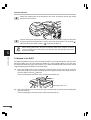
(B) Open the original cover and rotate the roller rotating knob to remove the misfed original
from the exit area.
If the misfed original cannot be easily removed, proceed to (C).
30
MISFEED REMOVAL
Roller rotating knob
With the RSPF, pull out the reversing tray to remove the misfed original.
With the RSPF, after removing the misfed original from the exit area, be sure to
insert the reversing tray into the exit area until it locks in place.
5
Copier trouble?
(C) If the original does not move easily into the exit area remove it in the direction of the arrow
while rotating the knob.
A number may appear in the display after a minus sign, indicating the number
of the originals that must be returned to the document feeder tray.
Clear the misfeed and return the required number of originals. Then press the
print (
) key to resume copying.
31
DEVELOPER REQUIRED
When the
indicator lights up, the developer should be replaced.DEVELOPER
REPLACEMENT SHOULD ONLY BE DONE BY AN AUTHORIZED SHARP SERVICE
TECHNICIAN. Contact your service center as soon as possible.
MAINTENANCE REQUIRED
When
indicator lights up, service by an authorized SHARP service technician is required.
Contact your service center as soon as possible.
5
Copier trouble?
32
TROUBLESHOOTING
If any problem occurs, check the list below before contacting your SHARP service center.
Problem
Possible cause
Copier plugged in?
Power switch on?
Side cover closed
securely?
Front cover closed?
Copier does not
operate.
Blank copies
Power save (
indicator on.
)
Dust, dirt,
smudges appear
on copies.
Striped copies
Paper misfeeds
frequently.
Images rub off
the copy easily.
Is original image too dark
or too light?
Is the copier in the
automatic exposure
mode?
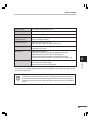
Is the copier in the photo
exposure mode?
Original table or original
cover dirty?
Original smudged or
blotchy?
Is transfer charger clean?
Non-standard paper used?
Paper curled or damp?
Pieces of paper inside
copier?
Paper guides in the paper
tray not set properly?
Too much paper in the
paper tray or bypass tray?
Is the copy paper too
heavy?
Paper damp?
Plug the copier into a grounded
outlet.
Turn the power switch on.
Gently close the side cover.
Gently close the front cover and
then close the side cover.
Place the original face down on
the original table or face up in
the RSPF.
Press any key to cancel the
preheat mode.
Press the print (
) key to
cancel the auto power shut-off
mode.
Adjust the exposure manually.
See
page:
_
13
_
_
13
20
20
5
16
Adjust the automatic exposure
level.
35
Cancel the photo exposure
mode.
Clean regularly.
16
Use a clean original.
_
Clean the transfer charger.
Use standard paper. If using
special papers, feed the paper
through the bypass tray.
Store copy paper flat in the
wrapper in a dry location.
Remove all pieces of misfed
paper.
Set the guides properly
depending on the paper size.
Remove excessive paper from
the tray.
Use copy paper within the
specified range.
Replace with dry copy paper. If
the copier is not used for a long
time, remove the paper from the
paper tray and store it in its
wrapper in a dry location.
26
38
Copier trouble?
Copies are too
dark or too light.
Is the original placed face
down on the original table
or face up in the RSPF?
Is the copier in the
preheat mode?
Is the copier in the auto
power shut-off mode?
Solution
25
_
27
10
10
38
39
33
STATUS INDICATORS
When the following indicators light up or blink on the operation panel or the following alphanumeric
codes appear in the display, solve the problem immediately referring to both the table below
and the relevant page.
Be sure to use only genuine SHARP parts and supplies.
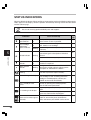
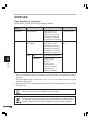
Indication
Cause and remedy
Developer replacement Steadily Developer is required. Contact your SHARP
service center as soon as possible.
required indicator
lit
Toner cartridge
replacement
required indicator
Steadily Replacement of toner cartridge will be needed
soon. Obtain a new cartridge.
lit
Blinking
Toner cartridge must be replaced. Replace it with
a new one.
See
page:
32
_
23
27
Misfeed indicator
A misfeed has occurred. Remove the misfed
paper referring to the description of “Misfeed
Blinking removal.”
The lower side cover may be open. If so, close
it.
Maintenance
indicator
Steadily Service by an authorized SHARP service
technician is required.
lit
32
RSPF misfeed
indicator
An original misfeed has occurred in the RSPF.
Blinking Remove the misfed originals referring to the
description of “Misfeed in the RSPF”.
30
5
Copier trouble?
The paper tray indicator is
blinking.
The paper tray is not installed properly.
Push the tray into the copier securely.
“CH” is blinking in the display. The toner cartridge is not installed. Install the
toner cartridge. If “CH” is blinking even if the
_
_
23
cartridge is installed properly, contact your
SHARP service center immediately.
“CH” is steadily lit in the
display.
“P” is blinking in the display.
Side cover is open. Close the side cover
securely by pressing the round projections
near the side cover open button.
_
Paper tray or bypass tray is empty. Load copy
paper.
10
A misfeed has occurred in the paper tray or
bypass tray. Remove the misfed paper.
27
The copier will not function. Turn the power
A letter and a number appear switch off, remove the power cord from the
outlet, and contact your SHARP service center.
alternately.
34
_
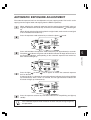
AUTOMATIC EXPOSURE ADJUSTMENT
The automatic exposure level can be adjusted to suit your copying needs. This level is set for
copying from the original table and copying from the RSPF respectively.
When adjusting the automatic exposure level for copying from the RSPF, place an
original in the document feeder tray and make sure that the RSPF ( ) indicator lights
up.
When adjusting the level for copying from the original table, make sure that no original
is left in the document feeder tray.
Press the exposure mode selector key to select the photo (
) mode.
Press and hold down the exposure mode selector key for approximately 5 seconds.
The photo ( ) indicator will go out and the AUTO indicator will begin to blink. One or
two exposure indicators corresponding to the automatic exposure level which has
been selected will light up.
5
Copier trouble?
Press the light ( ) or dark ( ) key to lighten or darken the automatic exposure
level as desired.
If exposure level 2 is selected, the two left-handmost indicators for that level will light
up simultaneously. Also, if level 4 is selected, the two right-handmost indicators for
that level will light up simultaneously.
Press the exposure selector key. The AUTO indicator will stop blinking and light up
steadily.
This automatic exposure level will remain in effect until you change it again by
this procedure.
35
APPENDIX
SPECIFICATIONS
6
Appendix
36
Type
Digital laser copier, desk-top type
Copy system
Dry, electrostatic transfer
Originals
Sheets, bound documents
Original size
Max. 10" x 14" (5-1/2" x 8-1/2" to 10" x 14" for RSPF)
Copy sizes
3-1/2" x 5-1/2" to 8-1/2" x 14"
(Feed copy paper lengthwise only.)
Image loss: Max. 5/32" (4 mm) (leading and trailing edges)
Max. 11/64" (4.5 mm) (along the other edges in
totals)
Max. 15/64" (6 mm) (the trailing edge of the second
copy of two-sided copying)
Copy speed
(one-sided copying)
15 copies/min.
Continuous copying
Max. 99 copies; subtractive counter
First-copy time
(Approximately)
9.6 s (normal copying mode)
Copy ratio
Variable: 50% to 200% in 1% increments (total 151 steps)
Fixed: 50%, 64%, 78%, 100%, 129%, 200%
Exposure system
Original table: Moving optical source, slit exposure (stationary
platen) with automatic exposure
RSPF: Moving original
Copy paper feed
One paper tray with automatic feed (250 sheets); one bypass tray
with 50-sheet automatic feed capability
Fusing system
Heat rollers
Development system
Magnetic brush development
Light source
Xenon lamp
Resolution
Scan: 400 dpi
Output: 600 dpi
Memory
6 MB
SPECIFICATIONS
AC 120V (±10%), 60 Hz (±2%)
Power consumption
1,000 W
Overall dimensions
31.9" (W) x 19" (D) (809 mm (W) x 483 mm (D))
Weight
(Approximately)
50.7 lbs. (23 kg)
Toner cartridge included
Copier dimensions
20.4" (W) x 19" (D) x 15" (H)
(518 mm (W) x 483 mm (D) x 379 mm (H))
Operating conditions
Temperature: 50°F to 86°F (10°C to 30°C)
Humidity: 20% to 85%
Noise level
Sound Power Level LWA
Copying: 71 [dB (A)], Standby: Background noise level
Sound Pressure Level LPA (bystander positions)
Copying: 40 [dB (A)], Standby: Background noise level
Noise emission measurement in accordance with ISO 7779.
Optional equipment
GDI expansion kit (AR-PG1)
PCL expansion kit (AR-PB9)
250-sheet paper feed unit (AR-DE9)
6
Appendix
Power supply
First-copy time may differ depending on operating conditions, such as power-supply voltage
and room temperature.
As a part of our policy of continuous improvement, SHARP reserves the right to
make design and specification changes for product improvement without prior
notice. The performance specification figures indicated are nominal values of
production units. There may be some deviations from these values in individual
units.
37
SUPPLIES
Types and sizes of copy paper
For best results, use only paper recommended by SHARP.
Type of paper
feeding
Type of media
Size
Weight
Paper tray
Standard paper
Letter (8-1/2" x 11")
Legal (8-1/2" x 14")
Invoice (5-1/2" x 8-1/2")
A4 (210 mm x 297 mm)
B5 (182 mm x 257 mm)
A5 (148.5 mm x 210 mm)
15 lbs. to 21 lbs.
Bypass tray
Standard paper and
thick paper
Letter (8-1/2" x 11")
Legal (8-1/2" x 14")
Invoice (5-1/2" x 8-1/2")
A4 (210 mm x 297 mm)
B5 (182 mm x 257 mm)
A5 (148.5 mm x 210 mm)
A6 (105 mm x 148.5 mm)
14 lbs. to 34.5
lbs.**
Special Transparency
media
film
Letter (8-1/2" x 11")
A4 (210 mm x 297 mm)
Envelope*
6
Appendix
Commercial 10
(4-1/8" x 9-1/2")
Monarch
(3-7/8" x 7-1/2")
International DL
(110 mm x 220 mm)
International C5
(162 mm x 229 mm)
* Do not use envelopes that have metal clasps, plastic snappers, string closures, windows,
linings, self-adhesive, patches or synthetic materials. These will cause physical damage to
the copier.
** For paper weighing from 28 to 34.5 lbs., 8-1/2" x 11" is the maximum size that can be fed
through the bypass tray.
●
Special papers such as transparency film and labels must be fed one sheet at a time through
the bypass tray.
Be sure to use only genuine SHARP parts and supplies.
For best copying results, be sure to use only SHARP Genuine Supplies which
are designed, engineered, and tested to maximize the life and performance of
SHARP copiers. Look for the Genuine Supplies label on the toner package.
38
SUPPLIES
Proper storage
1. Store the supplies in a location that is:
●
clean and dry,
●
at a stable temperature,
●
not exposed to direct sunlight.
2. Store copy paper in the wrapper and lying flat.
●
Paper stored out of the wrapper or in packages standing on end may curl or get damp,
resulting in paper misfeeds.
6
Appendix
39
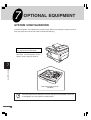
OPTIONAL EQUIPMENT
SYSTEM CONFIGURATION
A number of options are available for the copier which allow you to configure a copier system to
meet your particular needs. The options include the following.
GDI expansion kit (AR-PG1)*
PCL expansion kit (AR-PB9)*
* This option is not used for the copier
operation. For description of this
option, see the separate manual.
7
Optional equipment
250-sheet paper feed unit
(AR-DE9)
The GDI expansion kit (AR-PG1) and PCL expansion kit (AR-PB9) cannot be
used together at a time (exclusive combination).
40
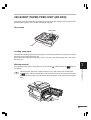
250-SHEET PAPER FEED UNIT (AR-DE9)
The paper feed unit provide the convenience of increased paper capacity for the copier and a
greater choice of paper sizes readily available for copying.
Part names
Side cover
Tray
Loading copy paper
The method of loading copy paper for the paper tray of the paper feed unit is the same as for the
paper tray in the copier. See page 10.
The method of changing the copy paper size is also the same for the paper tray in the copier.
See page 10.
Misfeed removal
) indicator blinks or
7
blinks in
Optional equipment
The copier will stop when a misfeed occurs. The misfeed (
the display.
Open the lower side cover (under the bypass tray) and remove the misfed paper.
If
blinks and the misfed paper is not seen from the area of the lower side cover,
pull out the lower paper tray and remove the misfed paper. Then close the lower paper
tray.
41
250-SHEET PAPER FEED UNIT (AR-DE9)
Close the lower side cover.
Close the side cover by pressing the round projections near the side cover open button.
The misfeed ( ) indicator will go out and the ready (
) indicator will light up.
Specifications
Copy paper size
Paper weight
Paper capacity
Weight
Dimensions
Power supply
5-1/2" x 8-1/2" to 8-1/2" x 14"
15 lbs. to 21 lbs.
One paper tray with capacity for 250 sheets of 21 lb. bond paper
Approx. 6.6 lbs. (3 kg)
19.6" (W) x 15.6" (D) x 3.5" (H)
(498 mm (W) x 395 mm (D) x 88 mm (H))
Drawn from the copier
As a part of our policy of continuous improvement, SHARP reserves the right to
make design and specification changes for product improvement without prior
notice. The performance specification figures indicated are nominal values of
production units. There may be some deviations from these values in individual
units.
7
Optional equipment
42
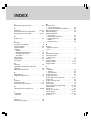
INDEX
2
250-sheet paper feed unit . . . . . . . . . . . 41
A
Auto clear . . . . . . . . . . . . . . . . . . . . 20, 21
Automatic exposure adjustment . . . . . . . 35
Auto power shut-off mode . . . . . . . . 20, 21
B
Bypass tray . . . . . . . . . . . . . . . . . . . . . . 18
C
Cautions . . . . . . . . . . . . . . . . . . . . . . . . . 4
Cautions on handling . . . . . . . . . . . . . . . . 9
Charger cleaner . . . . . . . . . . . . . . . . . . . 26
Copier trouble? . . . . . . . . . . . . . . . . . . . 27
Copying
– normal . . . . . . . . . . . . . . . . . . . . . . . . 12
– reduction/enlargement . . . . . . . . . . . . 17
– through bypass tray . . . . . . . . . . . . . . 18
– two-sided . . . . . . . . . . . . . . . . . . . . . . 12
Copy paper . . . . . . . . . . . . . . . . . . . . . . 38
Copy quantity . . . . . . . . . . . . . . . . . . . . . 15
Copy ratio . . . . . . . . . . . . . . . . . . . . . . . 17
D
Dark key . . . . . . . . . . . . . . . . . . . . . . . . 16
Developer replacement required
indicator . . . . . . . . . . . . . . . . . . . . . . . . . 32
Document feeder tray . . . . . . . . . . . . . . 13
E
Enlargement . . . . . . . . . . . . . . . . . . . . . 17
Exposure adjustment . . . . . . . . . . . . . . . 16
F
Features . . . . . . . . . . . . . . . . . . . . . . . . . 5
Fixed copy ratio . . . . . . . . . . . . . . . . . . . 17
Fusing unit release lever . . . . . . . . . . 6, 28
G
GDI expansion kit (AR-PG1) . . . . . . . 37,40
I
Installation
– location . . . . . . . . . . . . . . . . . . . . . . . . . 8
L
Light key . . . . . . . . . . . . . . . . . . . . . . . . 16
Loading copy paper . . . . . . . . . . . . . . . . 10
M
Maintenance
– user maintenance . . . . . . . . . . . . . . .
– maintenance required indicator . . . . .
Manual exposure . . . . . . . . . . . . . . . . . .
Manual feeding . . . . . . . . . . . . . . . . . . .
Misfeed removal
– fusing area . . . . . . . . . . . . . . . . . . . . .
– lower paper feed area . . . . . . . . . . . .
– paper feed area . . . . . . . . . . . . . . . . .
– RSPF . . . . . . . . . . . . . . . . . . . . . . . . .
– transport area . . . . . . . . . . . . . . . . . .
25
32
16
18
28
41
28
30
29
N
Names
– operation panel . . . . . . . . . . . . . . . . . . . 7
– part . . . . . . . . . . . . . . . . . . . . . . . . . . . . 6
O
ON LINE indicator . . . . . . . . . . . . . . . . . . 7
Operation panel
– part names . . . . . . . . . . . . . . . . . . . . . 7
Options . . . . . . . . . . . . . . . . . . . . . . . . . 40
Original cover . . . . . . . . . . . . . . . . . . . . . 6
Original guides . . . . . . . . . . . . . . . . . 6, 13
Original table . . . . . . . . . . . . . . . . . . . 6, 14
P
Paper
– loading . . . . . . . . . . . . . . . . . . . . . . . . 10
– special . . . . . . . . . . . . . . . . . . . . . . . . 38
– specifications . . . . . . . . . . . . . . . . . . . 38
Paper feed area . . . . . . . . . . . . . . . . . . . 28
Paper output tray . . . . . . . . . . . . . . . . . . . 6
Paper output tray extension . . . . . . . . 6, 12
Paper size . . . . . . . . . . . . . . . . . . . . . . . 38
Paper transport area . . . . . . . . . . . . . . . 29
Paper tray . . . . . . . . . . . . . . . . . . . . . . . . 6
Part names . . . . . . . . . . . . . . . . . . . . . . . 6
PCL expansion kit (AR-PB9) . . . . . . 37, 40
Photo mode . . . . . . . . . . . . . . . . . . . . 7, 16
Power on . . . . . . . . . . . . . . . . . . . . . . . . 13
Power save modes . . . . . . . . . . . . . 20, 21
Power switch . . . . . . . . . . . . . . . . . . . 6, 13
Preheat mode . . . . . . . . . . . . . . . . . 20, 21
Print key . . . . . . . . . . . . . . . . . . . . . . . . 15
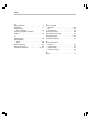
INDEX
R
Ready indicator . . . . . . . . . . . . . . . . . . . . 7
Reduction . . . . . . . . . . . . . . . . . . . . . . . 17
Replacement
– toner cartridge . . . . . . . . . . . . . . . . . . 23
Reversing single pass feeder
(RSPF) . . . . . . . . . . . . . . . . . . . . . . . . . 12
S
Special paper . . . . . . . . . . . . . . . . . . . . . 38
Specifications
– copier . . . . . . . . . . . . . . . . . . . . . . . . 36
– paper . . . . . . . . . . . . . . . . . . . . . . . . . 38
Status indicators . . . . . . . . . . . . . . . . . . 34
Storage of supply . . . . . . . . . . . . . . . . . . 39
Stream feeding mode . . . . . . . . . . . 16, 21
T
Toner cartridge
– indicator . . . . . . . . . . . . . . . . . . . . . 7, 34
– life . . . . . . . . . . . . . . . . . . . . . . . . . . . 25
– replacement . . . . . . . . . . . . . . . . . . . . 23
Toner save mode . . . . . . . . . . . . . . . . . . 20
Total number of copies . . . . . . . . . . . . . . 22
Transfer charger . . . . . . . . . . . . . . . . . 6, 26
Troubleshooting . . . . . . . . . . . . . . . . . . . 33
Two-sided copying . . . . . . . . . . . . . . . . . 12
U
User maintenance
– cabinet . . . . . . . . . . . . . . . . . . . . . . . .
– original cover . . . . . . . . . . . . . . . . . . .
– original table . . . . . . . . . . . . . . . . . . .
– transfer charger . . . . . . . . . . . . . . . . .
25
25
25
26
Z
Zoom . . . . . . . . . . . . . . . . . . . . . . . . . . . 17
Date Issued:Nov. 1, 2000
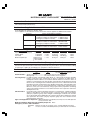
MATERIAL SAFETY DATA SHEET
MSDS No. F-01001
Section 1.
Product Identification
Product:
AR-152NT/T/FT/ST (Black Toner)
Section 2.
Supplier’s Name and Address
Sharp Corporation
22-22 Nagaike-cho, Abeno-ku, Osaka, Japan
Local suppliers are listed below. Please contact the nearest supplier for additional information.
(Country)
U.S.A.
Canada
United Kingdom
Section 3.
Ingredients
Ingredients
Styrene-Acrylate copolymer
Carbon black
Iron oxide
Metal Complex dye
Section 4.
(Name and Telephone Number)
Sharp Electronics Corporation
Telephone number for information: 1-800-237-4277
Emergency telephone number:
1-800-255-3924
Sharp Electronics of Canada Ltd.
Telephone number for information: 905-890-2100
Emergency telephone number:
1-800-255-3924
Sharp Electronics (U.K.) Ltd.
Telephone number for information: 01923-474013
{
CAS No.
29497-14-1
1333-86-4
1309-38-2
109125-51-1
109125-50-0
84179-66-8
Proportion
> 88 %
< 6.0%
< 4.5%
< 1.5%
OSHA PEL ACGIH TLV Other Limits
Not listed
Not listed
None
3.5mg/m3
3.5mg/m3
None
Not listed
Not listed
None
0.5mg/m3
0.5mg/m3
None
Hazardous Identification (Emergency Overview)
Toner is a fine, black powder possessing no immediate hazard. There are no anticipated carcinogenic
effects from exposure based on animal tests performed using toner. When used as intended according
to instructions, studies do not indicate any symptoms of fibrosis will occur.
Section 5.
Health Hazard Data
Route(s) of Entry:
Inhalation?
Skin?
Ingestion?
Yes
No
Possible but very unusual.
Health Hazards: Acute oral toxicity ------------- LDL0 of this toner is over 2,000mg/kg.
Mutagenicity -------------------- The result of Ames test is negative.
Carcinogenicity: In 1996 the IARC reevaluated carbon black as a Group 2B carcinogen (possible
human carcinogen). This classification is given to chemicals for which there is
inadequate human evidence, but sufficient animal evidence on which to base an
opinion of carcinogenicity. The classification is based upon the development of lung
tumors in rats receiving chronic inhalation exposures to free carbon black at levels
that induce particle overload of the lung. Studies performed in animal models other
than rats did not show any association between carbon black and lung tumors.
Moreover, a two-year cancer bioassay using a typical toner preparation containing
carbon black demonstrated no association between toner exposure and tumor
development in rats.
Chronic Effect: In a study in rats of chronic inhalation exposure to a typical toner, a mild to moderate
degree of lung fibrosis was observed in 92% of the rats in the high concentration
(16mg/m3) exposure group, and a minimal to mild degree of fibrosis was noted in
22% of the animals in the middle (4mg/m3) exposure group, but no pulmonary change
was reported in the lowest (1mg/m3) exposure group, the most relevant level to
potential human exposures.
Signs and Symptoms of Exposure: Minimal irritation to respiratory tract may occur as with exposure
to any non-toxic dust.
Medical Conditions Generally Aggravated by Exposure: None
Emergency and First Aid Procedures:
Inhalation; Remove to fresh air. If effects occur, consult medical personnel.
Eye;
In case of contact, immediately flush eyes with water for 15 minutes.
Section 6.
Physical Chemical Characteristics
Boiling / Melting Point:
Vapor Pressure:
Vapor Density:
Evaporation Rate:
Appearance:
Odor:
Section 7.
Not applicable
Not applicable
Not applicable
Not applicable
Fine powder
Odorless
Not applicable
>350°C
(LEL); Not applicable
(UEL); Not applicable
CO2, dry chemical, foam or water
None
This material has no unusual fire or explosion hazards.
None
None
Reactivity Data
Stability:
Incompatibility (Material to Avoid):
Hazardous Decomposition:
Hazardous Polymerization:
Section 9.
1.1
Negligible
Not applicable
Not applicable
Black
Fire and Explosion Data
Flash Point (Method Used):
Ignition Temperature:
Flammable Limits:
Extinguishing Media:
Special Fire Fighting Procedure:
Unusual Fire and Explosion Hazard:
Sensitivity to Mechanical Impact:
Sensitivity to Static Charge:
Section 8.
Specific Gravity:
Solubility in Water:
PH:
Viscosity:
Color:
Stable
None
CO and NOx
Will not occur.
Precautions for Safe Handling and Use
Personal Protection Information (Respiratory, Eye Protection and Protective Glove):
Use of a dust mask is recommended when handling a large quantity of toner or
during long term exposure, as with any non-toxic dust.
Engineering Control / Ventilation:
Not required.
Work / Hygienic Practice:
Inhalation should be minimized as with any non-toxic
dust.
Steps to be taken in case of Spill or Leak: Sweep up or clean up with vacuum cleaner.
Waste Disposal Method:
Waste material may be dumped or incinerated under
conditions which meet all federal, state and local
environmental regulations.
Section 10.
Regulatory Information
NFPA Rating (U.S.A.):
WHMIS Legislation (Canada):
Transport Information:
UN No.:
Section 11.
Health = 1
Flammability = 1
This product is not a controlled product.
This product is not a hazardous material.
None allocated.
Reactivity = 0
Other Information
References: IARC (1996) IARC Monographs on the Evaluation of the Carcinogenic Risk of Chemicals
to Humans, Vol. 65, Printing Process and Printing inks, Carbon Black and Some Nitro
Compounds, Lyon, pp-149-261
H. Muhle, B. Bellmann, O. Creutzenberg, C. Dasenbrock, H. Ernst, R. Kilpper, J. C.
MacKenzie, P. Morrow, U. Mohr, S. Takenaka, and R. Mermelstein (1991) Pulmonary
Response to Toner upon Chronic Inhalation Exposure in Rats. Fundamental and Applied
Toxicology 17, pp. 280-299
Date Issued :Nov. 1, 2000
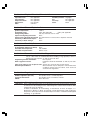
MATERIAL SAFETY DATA SHEET
MSDS No. F-31001
Section 1.
Product Identification
Product
AR-152ND/DV/SD (Black Developer)
Section 2.
Supplier’s Name and Address
Sharp Corporation
22-22 Nagaike-cho, Abeno-ku, Osaka, Japan
Local suppliers are listed below. Please contact the nearest supplier for additional information.
(Country)
U.S.A.
Canada
United Kingdom
Section 3.
Ingredients
Ingredients
Iron powder
Styrene-Acrylate copolymer
Carbon black
Section 4.
(Name and Telephone Number)
Sharp Electronics Corporation
Telephone number for information: 1-800-237-4277
Emergency telephone number:
1-800-255-3924
Sharp Electronics of Canada Ltd.
Telephone number for information: 905-890-2100
Emergency telephone number:
1-800-255-3924
Sharp Electronics (U.K.) Ltd.
Telephone number for information: 01923-474013
CAS No.
7439-89-6
29497-14-1
1333-86-4
Proportion
> 92.5%
< 7.0%
< 0.5%
OSHA PEL ACGIH TLV Other Limits
Not listed
Not listed
None
Not listed
Not listed
None
3.5mg/m3
None
3.5mg/m3
Hazardous Identification (Emergency Overview)
Developer is a black powder containing small amounts of toner, and possessing no immediate hazard.
There are no anticipated carcinogenic effects from exposure based on animal tests performed using
toner.
Section 5.
Health Hazard Data
Route(s) of Entry:
Inhalation?
Skin?
Ingestion?
No
No
Possible but very unusual.
Health Hazards: Acute oral toxicity ------------- LDL0 of this toner which is included in this developer
is over 2,000mg/kg.
Mutagenicity -------------------- The toner, which is included in this developer, has been
tested on Ames test. The result is negative.
Carcinogenicity: In 1996 the IARC reevaluated carbon black as a Group 2B carcinogen (possible
human carcinogen). This classification is given to chemicals for which there is
inadequate human evidence, but sufficient animal evidence on which to base an
opinion of carcinogenicity. The classification is based upon the development of lung
tumors in rats receiving chronic inhalation exposures to free carbon black at levels
that induce particle overload of the lung. Studies performed in animal models other
than rats did not show any association between carbon black and lung tumors.
While there have been no studies to date using developer, a two-year cancer
bioassay using a typical toner preparation containing carbon black (a small amount
of toner is included in the developer mixture) demonstrated no association between
toner exposure and tumor development in rats.
Signs and Symptoms of Exposure: Minimal irritation to respiratory tract may occur as with exposure
to any non-toxic dust.
Medical Conditions Generally Aggravated by Exposure: None
Emergency and First Aid Procedures:
Inhalation; Remove to fresh air. If effects occur, consult medical personnel.
Eye;
In case of contact, immediately flush eyes with water for 15 minutes.
Section 6.
Physical Chemical Characteristics
Boiling / Melting Point:
Vapor Pressure:
Vapor Density:
Evaporation Rate:
Appearance:
Odor:
Section 7.
Not applicable
Not applicable
Not applicable
Not applicable
Fine powder
Odorless
Not applicable
>350°C
(LEL); Not applicable
(UEL); Not applicable
CO2, dry chemical, foam or water
None
This material has no unusual fire or explosion hazards.
None
None
Reactivity Data
Stability:
Incompatibility (Material to Avoid):
Hazardous Decomposition:
Hazardous Polymerization:
Section 9.
about 7.3
Negligible
Not applicable
Not applicable
Black
Fire and Explosion Data
Flash Point (Method Used):
Ignition Temperature:
Flammable Limits:
Extinguishing Media:
Special Fire Fighting Procedure:
Unusual Fire and Explosion Hazard:
Sensitivity to Mechanical Impact:
Sensitivity to Static Charge:
Section 8.
Specific Gravity:
Solubility in Water:
PH:
Viscosity:
Color:
Stable
None
CO and NOx
Will not occur.
Precautions for Safe Handling and Use
Personal Protection Information (Respiratory, Eye Protection and Protective Glove):
None required under normal use.
Engineering Control / Ventilation:
Not required.
Work / Hygienic Practice:
Not required.
Steps to be taken in case of Spill or Leak: Sweep up or clean up with vacuum cleaner.
Waste Disposal Method:
Waste material may be dumped or incinerated under
conditions which meet all federal, state and local
environmental regulations.
Section 10.
Regulatory Information
NFPA Rating (U.S.A.):
WHMIS Legislation (Canada):
Transport Information:
UN No.:
Section 11.
Health = 1
Flammability = 1
This product is not a controlled product.
This product is not a hazardous material.
None allocated.
Reactivity = 0
Other Information
References: IARC (1996) IARC Monographs on the Evaluation of the Carcinogenic Risk of Chemicals
to Humans, Vol. 65, Printing Process and Printing inks, Carbon Black and Some Nitro
Compounds, Lyon, pp-149-261
H. Muhle, B. Bellmann, O. Creutzenberg, C. Dasenbrock, H. Ernst, R. Kilpper, J. C.
MacKenzie, P. Morrow, U. Mohr, S. Takenaka, and R. Mermelstein (1991) Pulmonary
Response to Toner upon Chronic Inhalation Exposure in Rats. Fundamental and Applied
Toxicology 17, pp. 280-299
This device complies with Part 15 of the FCC rules. Operation is subject to the
following two conditions: (1) This device may not cause harmful interference, and (2)
this device must accept any interference received, including interference that may
cause undesired operation.
WARNING:
FCC Regulations state that any unauthorized changes or modifications to this
equipment not expressly approved by the manufacturer could void the user’s authority
to operate this equipment.
Note:
This equipment has been tested and found to comply with the limits for a Class B
digital device, pursuant to Part 15 of the FCC Rules. These limits are designed to
provide reasonable protection against harmful interference in a residential installation.
This equipment generates, uses and can radiate radio frequency energy and, if not
installed and used in accordance with the instructions, may cause harmful
interference to radio communications.
However, there is no guarantee that interference will not occur in a particular
installation. If this equipment does cause harmful interference to radio or television
reception, which can be determined by turning the equipment off and on, the user is
encouraged to try to correct the interference by one or more of the following
measures:
Reorient or relocate the receiving antenna.
Increase the separation between the equipment and receiver.
Connect the equipment into an outlet on a circuit different from that to which the
receiver is connected.
Consult the dealer or an experienced radio/TV technician for help.
NOTICE
BE SURE TO ASK YOUR AUTHORIZED SHARP DEALER ABOUT THE WARRANTY THAT
YOUR SELLING DEALER EXTENDS TO YOU. In order to assure you, the end-user, of
warranty protection, Sharp extends a limited warranty to each of its authorized dealers
and, in turn, requires each of its authorized dealers to extend its own warranty to you on
terms that are no less favorable than those given to the dealer by Sharp. You should be
aware, however, that Sharp does not itself extend any warranties, either express or implied,
directly to you, the end-user, and no one is authorized to make any representations or
warranties on behalf of Sharp. Specifically, SHARP DOES NOT EXTEND TO YOU, THE
END-USER, ANY EXPRESS WARRANTY OR ANY IMPLIED WARRANTY OF
MERCHANTABILITY, FITNESS FOR USE OR FITNESS FOR ANY PARTICULAR
PURPOSE IN CONNECTION WITH THE HARDWARE, SOFTWARE OR FIRMWARE
EMBODIED IN, OR USED IN CONJUNCTION WITH THIS PRODUCT. Sharp is not
responsible for any damages or loss, either direct, incidental or consequential, which you,
the end-user, may experience as a result of your purchase or use of the hardware, software
or firmware embodied in or used in conjunction with this Product. Your sole remedy, in the
event that you encounter any difficulties with this Product, is against the authorized dealer
from which you purchased the Product.
AR-156 Digital Laser Copier
In the event that this authorized dealer does not honor its warranty commitments, please
contact the General Manager, Business Products Group, Sharp Electronics Corporation, Sharp
Plaza, Mahwah, NJ 07430-2135, so that Sharp can try to help assure complete satisfaction
of all the warranty rights to which you are entitled from the authorized dealer.
AR-156
SHARP ELECTRONICS CORPORATION
Sharp Plaza, Mahwah, New Jersey 07430-2135.
www.sharp-usa.com
SHARP CORPORATION
PRINTED IN CHINA
2000M
KS
TINSE0464QSZZ