1
4. Hardware Setup
• 4-2 Rear Cooling Fan Control Board
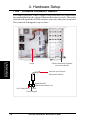
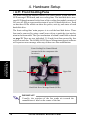
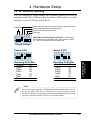
The rear fans are controlled and monitored by a control board. The fan control board requires power input from the power supply which allows the
individual fans to obtain their power when connected to the control board.
The ASMA software can monitor the fan status from the fan control board.
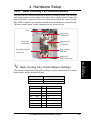
The fan control board’s cable connections are shown below.
Fan
Fan Power
Connectors
Reserved
Connector
Power Input
Connector
Fan Status Signal
Connector
Fan Control
Settings
Rear Cooling Fan Control Board Settings
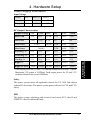
The rear fan control board has DIP switches to allow controlling the control
board status and the number of fans.
DIP Switch SET1 Fan Control Board Setting
ON (momentarily) Reset Control Board
OFF
Normal (Default)
SET2 SET3
SET4
Number of Fans
ON
ON
ON
ON
ON
OFF
1
2 (Default)
ON
ON
OFF
OFF
OFF
ON
ON
OFF
ON
3
4
5
OFF
OFF
ON
OFF
OFF
ON
6
7
OFF
OFF
OFF
8
AP2300 Hardware Reference Guide
19
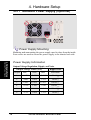
Rear Fans
4. Hardware Setup
Reserved
Fan Connectors