1
SimpleComTools, LLC
App Note: COM1000 – Wiegand Card Readers
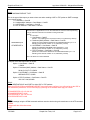
Step 5:
Set the WIEGAND REPORT TYPE.
This is the type of data report you want to have sent when sending a UDP or TCP packet or SMTP message.
Your choices include:
1 = Card Status + Card ID
2 = Hardware/MAC Address + Card Status + Card ID
3 = HOSTNAME + Card Status + Card ID
4 = PPP IP Address + Card Status + Card ID
WIEGAND Reports
AT*WREPORT=n
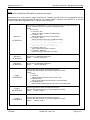
Sets the first of 3 applications to run on the Terminal Port. Enter the value representing
how you want the Terminal Port to handle incoming serial data.
Options:
0 = No Action
1 = Card Status + Card ID
(Sends 1 or 0 indicating if the card was a match or not, followed by card ID)
2 = Hardware (MAC) Address + Card Status + Card ID
(Sends the unique hardware address of the COM1000 followed by a 1 or 0
indicating if the card was a match or not, followed by card ID)
3 = HOSTNAME + Card Status + Card ID
(Sends the COM1000 HOSTNAME value followed by a 1 or 0
indicating if the card was a match or not, followed by card ID)
4 = PPP IP Address + Card Status + Card ID
(Sends the current PPP IP Address of the COM1000 followed by a 1 or 0
indicating if the card was a match or not, followed by card ID)
Note: All values are comma delimited.
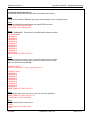
Examples of the data reports are as follows:
Option 1: Card Status + Card ID
1,52858
Option 2: Hardware (MAC) Address + Card Status + Card ID
00:90:C2:CA:3F:1F,0,52858
Option 3: HOSTNAME + Card Status + Card ID
WIEGAND-TEST,1,52858
Option 4: PPP IP Address + Card Status + Card ID
166.139.71.240,0,52858
Step 6:
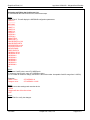
Set the DESTINATION IP and PORT for either UDP or TCP packets.
Once the APPLICATION and WIEGAND REPORT types have been configured, you will need to set the UDP or
TCP destination parameters. This is done simply by entering the IP address and 5 digit port number.
AT*WUDPDESTIP=123.123.123.123
AT*WUDPDESTPORT:12345
AT*WTCPDESTIP: 123.123.123.123
AT*WTCPDESTPORT:12345
Step 7:
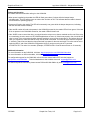
Save the settings using the AT&W command and then reset the device using eth reset button or the ATZ command.
>AT&W
Changes will take effect after reboot
>ATZ
7/27/2006
Simple Com Tools, LLC
Page 6 of 9