1
TS400/TS410 Installation Instructions
Program Zones
The TS400 zones may be programmed so that
they perform different functions. The zones types
are as follows:
Alarm
Zones 1- 5 can be programmed as alarm zones,
this type of zone will only generate a full alarm
when activated during a set condition.
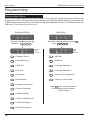
Programming
➤ To program zones proceed as follows:
1. Ensure that the engineer’s menu is selected,
then press [1] to select program zones.
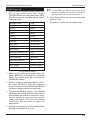
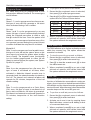
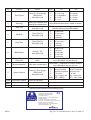
2. Press keys [1] to [5] to toggle between the two
options for each zone as shown below.
Zone LED
LED On
LED Off
Zone 1
Access
Alarm
Zone 2
Access
Alarm
Access
Zone 3
Keyswitch
Alarm
Zones 1 and 2 can be programmed as access
zones, this type of zone is automatically isolated
during the entry/exit procedure to allow a walk
through route for the user. Once the system is full
set the access zones respond as alarm zones. If an
access zone is armed during the part set (Home)
condition it will start the entry timer if activated.
Zone 4
Fire
Alarm
Zone 5
PA
Alarm
Keyswitch
Zone 3 can be programmed as a keyswitch zone,
this type of zone will set the system when active
(zone open) and unset the system when healthy
(zone closed). The keyswitch zone functionality
can be further programmed to either full set
(Away) or part set (Home) the system, see "System
Options" on page 17.
Fire
Zone 4 can be programmed as a fire zone, this
type of zone is monitored at all times, when
activated a distinctive internal sounder tone is
generated and the external sounder is pulsed on
and off. The internal and external sounders will
operate for 20 minutes, irrespective of the bell
duration setting.
P.A.
Zone 5 can be programmed as a Panic Alarm
(P.A.) zone, this type of zone is monitored at all
times, when activated a full alarm is generated.
The internal and external sounders will operate for
20 minutes, irrespective of the bell duration
setting.
3. When completed, press [0] to accept, a high
pitched acceptance tone will be heard and
the system returns to the engineer’s menu.
View Event Log
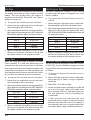
The TS400 will store up to 4 alarm activation events
within the memory log. This option allows the
events to be viewed.
➤ To view the event log proceed as follows:
1. Ensure that the engineer’s menu is selected,
then press [2] to select view event log.
2. Press [1] to view the newest event, [4] to view
the oldest event etc.
3. When completed, press [0] to accept, a high
pitched acceptance tone will be heard and
the system returns to the engineer’s menu.
Walk Test
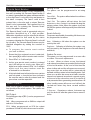
The Walk Test option allows the engineer to test the
function of all detection zones without causing an
alarm. As each zone is activated its zone indicator
LED will light and the internal sounder generates a
two-tone sound. When the zone is deactivated the
sounder stops and the zone LED goes out.
➤ To perform a walk test proceed as follows:
1. Ensure that the engineer’s menu is selected,
then press [3] to select walk test.
2. Activate each zone in turn by opening doors
fitted with alarm contacts and walking in front
of movement detectors.
3. When completed, press [0] to accept, a high
pitched acceptance tone will be heard and
the system returns to the engineer’s menu.
15