1
5 If any of the following conditions occur, turn off the printer and unplug the power cord
from the power outlet:
• The power cord is damaged or frayed.
• Liquid has been spilled into the printer or the printer has been exposed to rain or water.
• The printer does not recover from an error or the printer does not operate normally when
the operating instructions are followed.
• The printer exhibits a distinct change in performance, such as emitting a strange noise,
odor or smoke.
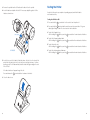
6 Before using your SLP, please remove the clear protective tape covering on the engine
cover and Roll cover.
7 When the SLP is unused for a period of time without a label, the platen rubber may
become stuck. This condition may cause a fatal error in the printer mechanism. To avoid
this, please keep a label loaded in the SLP — even when not in use.
Installation
For best performance, we recommend that you install your printer on a flat surface in a
location that satisfies the following environmental conditions:
• Not subject to vibration
• Not exposed to direct sunlight
• Dust-free
• Condensation-free
• Temperatures: 59 to 95°F (15 to 35°C)
• Humidity: 30% RH to 80% RH (non-condensing)
About This Guide
As you‘ll soon realize, the Smart Label Printer is easy to set up and use. Chances are, once
you’ve read what you need to know in order to get going, you won’t have to use this guide
except as a quick reminder or a reference.
This guide will help you set up your SLP 440 or 450, install the software, and use your SLP.
In writing this guide we assume that you are familiar with common operations using
Microsoft Windows ® 2000, XP, 2003, Server 2003, Vista or Windows 7 on a Windows
compatible PC, or Mac OS ® X 10.2 or later on an Apple Macintosh computer.
This guide has six sections for easy reference:
Introduction, provides some general information about the SLP 440 and 450 as well as
the Smart Label program.
Getting Started, provides instructions for connecting the SLP 440 and 450 to your Windowscompatible PC or Mac, and loading labels into the printer. It also describes how to use
on-line help.
Changing Labels and Printer Care, provides information for replacing a label roll and taking
care of your SLP.
Specifications, provides SLP 440 and 450 specifications.
Commonly Asked Questions and Answers, provides a list of questions and answers that can
help you resolve problems.
Technical Support and Service, provides technical support and service information.
Ordering Labels and Parts, provides information for ordering SmartLabels and replacement
parts and accessories.