1
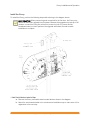
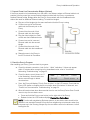
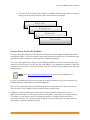
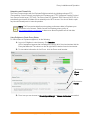
Envoy Installation and Operation 2. Register the Envoy Register the Envoy at the beginning of the PV installation. a. Visit http://enlighten.enphaseenergy.com/register. b. Register the site owner information and the Envoy serial number in the space provided in the online form. 3. Find a Location for the Envoy Enphase recommends that the Envoy be placed as close to the load center as possible. This ensures that the Envoy receives the strongest possible signal from each microinverter. The Envoy can be placed on a table or it can be wall mounted. For wall mounting instructions, see “Wall Mounting” on page 11. a. Locate an electrical outlet close to the site’s load center. b. Place the Envoy so that its AC cord can reach this outlet. 4. Connect Ethernet and Power Cables a. Plug the Ethernet cable into the Ethernet port on the Envoy. b. Plug the other end of the cable into a spare port on the broadband router. The Envoy needs to obtain a DHCP (Dynamic Host Configuration Protocol) IP address and have a path to the Internet. The Envoy will request a dynamically assigned (DHCP) IP address from the broadband router during the power-up sequence. Two small green LEDs on the Ethernet port indicate link and activity. One LED will be solid green, and the other will blink green every few seconds. NOTE: Next to the Ethernet port on the Envoy, there are one or two ports identified by a USB symbol. You can use these ports to connect optional devices, such as a wireless communication device for the Enphase Environ Smart Thermostat. The USB ports cannot be used for a wired or a wireless Ethernet connection. c. Plug the AC power cord into the AC input on the Envoy. WARNING! Do not remove power from the Envoy if the LCD displays: “Upgrading. . . Do Not Unplug.” d. Plug the other end of the power cord into a dedicated 120VAC power outlet (not a power strip). For best results, the outlet should be near the load center. WARNING! Do not plug the Envoy into a power strip, surge protector, or uninterruptable power supply (UPS). The surge suppression or filtering from a power strip or other protective device can substantially diminish communication performance. If possible, do not plug a power strip power cord into the same outlet that the Envoy is using. The surge suppression or filtering components of a power strip may still interfere with communications if they are near the Envoy. 9 Copyright 2012 Enphase Energy 141-00011 Rev 03