1
5
5-5
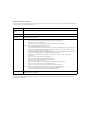
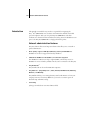
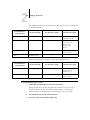
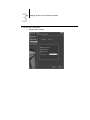
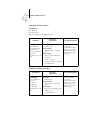
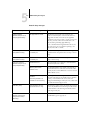
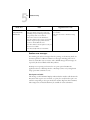
After this Setup screen
Troubleshooting
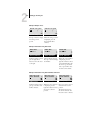
This message
Means
Select NDS Tree
(Network Setup>Service
Setup>PServer Setup>
NDS Setup)
Warning! Selecting a new NDS
tree deletes Bindery setup.
You have previously connected the Fiery X3 to a different
NDS tree. NetWise supports only a single NDS tree
connection. To avoid a potential conflict with an existing
tree connection (for example, if the connection was made
through a NetWare 4.x server in emulation mode), all
bindery settings will be deleted.
If you choose OK, and choose Yes at the following prompt
(Delete Bindery setup and continue?), bindery settings are
deleted and must be reentered in Bindery Setup.
To avoid deleting the bindery settings press the Menu key,
or select OK and choose No in the following message
screen (Delete Bindery setup and continue?).
Repeat NDS Setup without changing the NDS tree, or exit
to Bindery Setup to review your current bindery settings.
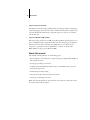
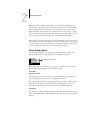
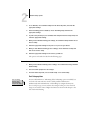
Navigating NDS tree
(Network Setup>Service
Setup>PServer Setup>
NDS Setup)
___ is empty.
The chosen container contains no sub-containers or
objects relevant to the current mode of navigation.
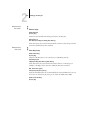
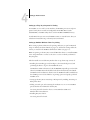
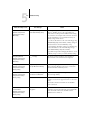
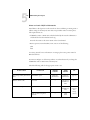
Bindery Setup
(Network Setup>Service
Setup>PServer Setup>
Bindery Setup)
If you also plan to use NDS,
set up NDS before Bindery.
No NDS settings are present. You are reminded to perform
NDS Setup before Bindery Setup in case your network
includes both NDS and bindery servers.
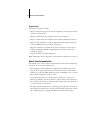
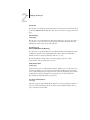
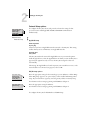
Select File Server From List
(Network Setup>Service
Setup>PServer Setup>
Bindery Setup)
Error. Cannot open bindery
connection to NDS server.
Select this server through NDS setup or disable NDS and
select it through bindery.
No NetWare file server found.
No file server was found when Fiery X3 queried the
network to create a list of supported servers or a list of all
servers.
Check cable connections and make sure the NetWare
server is turned on.
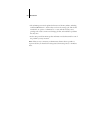
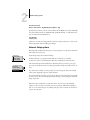
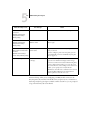
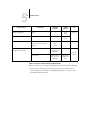
Enter First Letters
of Server Name
(Network Setup>Service
Setup>PServer Setup>
Bindery Setup)
File server name not found.
Try again?
No file server with those letters was found when Fiery X3
queried the network. Check the name of the NetWare file
server, check cable connections, and make sure the
NetWare server is turned on.