1
BASIC OPERATION (Continued)
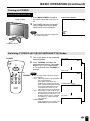
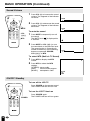
Sound Volume
1
POWER
Press VOL (+) to increase the sound
volume. The segment of the indicator
increases.
VOLUME
50
DISPLAY
SLEEP
BRIGHT
2
MENU
MUTE
TV/VIDEO
FLASHBACK
VOL
Press VOL (–) to decrease the sound
volume. The segment of the indicator
decreases.
VOLUME
10
MUTE
CH
1
2
3
4
5
6
7
8
9
MTS
0
100
VOL
(+)/(–)
To mute the sound
1
Press MUTE to temporarily turn off
the sound.
The MUTE mark
is displayed for
4 seconds.
2
Press MUTE or VOL (+)/(–) to turn
the sound back to the previous level.
The mute function is automatically
turned off when any of the following
buttons are pressed: POWER,
VOL (+)/(–), or MTS.
MTS
VOLUME
30
To select MTS (Multi ch TV Sound)
1
Press MTS to display the MTS
screen.
2
Press MTS
settings.
[STEREO]:
[SAP]:
[MONO]:
to select the MTS
stereo audio
second audio program
monophonic audio
ON/OFF Standby
To turn off the LCD TV
POWER
Press POWER on the remote control.
The POWER indicator will turn red.
DISPLAY
SLEEP
BRIGHT
MENU
MUTE
To turn the LCD TV back on
TV/VIDEO
FLASHBACK
VOL
16
CH
POWER
1
2
3
4
5
6
7
8
9
MTS
0
100
2
Press POWER again.
The POWER indicator will turn green.
STEREO
SAP
MONO