1
Quick Start Guide
2 Quick Start Guide
Initial Setup
1
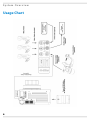
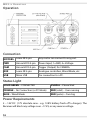
Plug 12V into the RECEIVER's “PWR” port.
Max voltage is 17V. If the voltage is over ~17.5V or polarity is reversed,
The Receiver will block the dangerous voltage and not start.
2
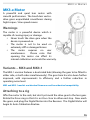
Affix one or more MOTORS to the rods/ lens.
Note that the motors are labelled as FOCUS, IRIS, etc.
3
Plug the motors into the RECEIVER unit.
The motor port that the motors attach to isn't important. The motors will begin
calibrating.
4
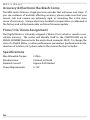
Put a Canon LP-E6 battery in the Hand Unit and hold down
the PWR button.
Camera Run/Stop
1
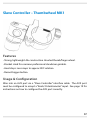
Connect the appropriate Run/Stop cable from the CAM
port on the Receiver to your Camera.
2
Enter the Controller’s MENU, Select CAMERA, then select
which camera you have connected.
3
You can now Run/Stop the camera with the REC button.
3