1
Adjusting and Checking Volume
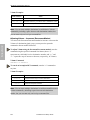
Volume Examples:
BCS Command
CL0O3VR60T
CL0O1 2VR-120T
CL0O7VX
Action
Increases Volume by 6.0 dB for Level 0, destination 3
Decreases Volume by -12.0 dB for Level 0, destinations 1 and 2
Cancels the incomplete command
Note: You can enter multiple destinations in each Relative Volume
command by including a space between each destination number, but
you can enter only one level per command line.
Adjusting Volume – Increment/Decrement Method
Volume Control
You can use the Increment/Decrement method to increase or decrease the
Volume of a destination signal a step; you may need to repeat the
command to hear an audible difference.
To adjust Volume using the Increment/Decrement method, enter the
command using the specified command line format (where “#”
represents any valid audio level or destination number, and “S+” and
“S–” represent a step of increase or decrease, respectively, in Volume).
Volume Command:
CL#O#VS+T or CL#O#VS-T
To cancel an incomplete BCS command, enter the “X” command at
any time.
Volume Examples:
BCS Command
CL0O3VS+T
CL0O4 8VS-T
CL0O7VX
Action
Increases Volume a step for Level 0, destination 3
Decreases Volume a step for Level 0, destinations 4 and 8
Cancels the incomplete command
Note: You can enter multiple destinations in each Increment/Decrement
Volume command by including a space between each destination
number, but you can enter only one level per command line.
8-6
Installation and Setup Guide