1
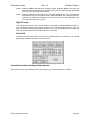
Workstation Card Rev 1.2 Software Control Software Control In order to function correctly, when prompted by the software for the type of audio interface connected, you should select Digidesign 888/24 I/O interface. The Genex Workstation card emulates this unit. Select 888/24 I/O Screenshots of Hardware Setup Control Panel The Genex Workstation Card allows the hardware setup control panel (see above) within the audio software (e.g., Pro Tools ) to change many parameters on the GXA8 or GXD8.These are: • • • • Sample rate (44.1kHz and 48kHz) Sync source (“internal” or “external”) – only with GXA8 / GXD8 firmware earlier than v3.0 Input source (analogue or digital) Digital format. Selects between AES/EBU or SPDIF for the channel status format on the digital outputs • Peak Hold (on or off) Sample Rate This will change the sample rate of the GXA8 / GXD8 into which the Workstation card is fitted. Only 44.1kHz and 48kHz are available. In addition, the converter will only change sample rate when it is in master mode; it auto-detects the sample rate when it is locked to an external clock. Sync Mode This menu only has a function when the GXA8 / GXD8 is fitted with firmware earlier than v3.0. Its operation was disabled as the converters can lock to several different clock sources and it is therefore easier and more logical to choose the clock source using the front panel button. Therefore, to choose clock source, use the converter front panel button The exception is when the 256x sample clock (i.e., superclock) is connected to the GX8-WSIF card. In this case, the converter locks to this clock and will show on the front panel that the clock source is from the slot into which the GX8-WSIF card is fitted Input Source This operates slightly differently depending on whether the GX8-WSIF card is fitted to the GXA8 or the GXD8: Genex Research Limited Page 9