1
5
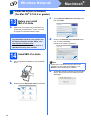
Install the ink cartridges
e
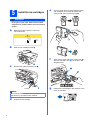
Turn the green knob on the protective yellow
cap clockwise until it clicks to release the
vacuum seal, then remove the cap a.
WARNING
If ink gets in your eyes, wash them out with
water at once, and if irritation occurs consult a
doctor.
a
Make sure that the power is turned on.
The LCD shows:
No Cartridge
Install Ink
BK Black
C Cyan
b
Y
M
1
Yellow
Magenta
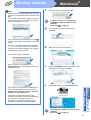
Open the ink cartridge cover a.
f
c
1
Remove the green protective part a.
Take care to match the colour of the lever a
with the cartridge colour b, as shown in the
diagram below.
1
2
1
Note
Do not throw away the green protective part. You
will need it if you transport the machine.
d
4
Unpack the ink cartridge.
g
Install each ink cartridge in the direction of the
arrow on the label.