1
Hardware Upgrades
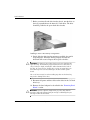
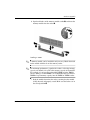
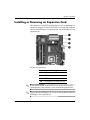
6. Open both latches of the memory module socket 1, and insert the
memory module into the socket 2.
Installing a DIMM
module can be installed in only one way. Match the notch
✎ Aonmemory
the module with the tab on the memory socket.
maximum performance, populate the sockets so that the memory
✎ For
capacity of Channel A is equal to the memory capacity of Channel B.
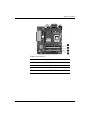
For example, if you have one preinstalled DIMM in socket XMM1
and are adding a second DIMM, it is recommended that you install a
DIMM of equal memory capacity into the XMM3 or XMM4 socket.
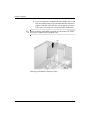
7. Push the module down into the socket, ensuring that the module
is fully inserted and properly seated. Make sure the latches are in
the closed position 3.
Hardware Reference Guide
www.hp.com
2–13