1
Use and Care Guide
Oven Cooking
Control Panel
A
B
E
F
G
H
C
D
I
J
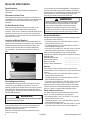
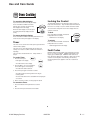
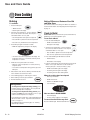
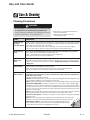
The control panel is designed for ease in programming. The display window on the control shows time of day, timer and oven functions.
Control panel shown includes model specific features. (Styling may vary depending on model.)
A
Broil
Use for broiling and top browning.
Clock
B
Bake
Use for baking and roasting.
C
More+ or
Less-
Enters or changes time, oven
temperature. Sets HI or LO broil.
The clock can be set to display time in a 12-hour or 24-hour
format. The clock is set at the factory for the 12-hour format.
D
Timer
Sets Timer.
E
Cook & Hold
Bakes for a preset time, then holds food
warm for 1 hour.
F
G
Clean
Delay
Use to set self-clean cycle.
Programs the oven to start baking at
a later time.
H
Clock
Use to set time-of-day clock.
To set the Clock:
I
Keep Warm
Use to keep cooked food warm in oven.
1. Press the Clock pad.
J
CANCEL
Cancels all operations except Timer
and Clock.
To change the clock to 24-hour format:
1. Press and hold the CANCEL and Delay
pads for three seconds.
2. Press the More+ or Less - pad to select
12 or 24 hour.
3. Set the time of day following the
directions below.
• Time of day and the colon flash in the
display.
2. Press the More+ or Less- pad to set the
time of day.
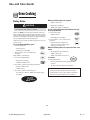
Using the Touchpads
• Colon continues flashing.
3. Press the Clock pad again or wait four
seconds.
• Press the desired pad.
• Press the More+ or Less- pad to enter time or temperature.
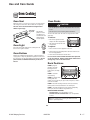
When electrical power is supplied or after a power interruption, the last clock time before power was interrupted will
flash.
• A beep will sound when any pad is touched.
• A double beep will sound if a programming error occurs.
To recall the time of day when another time function is
showing, press the Clock pad.
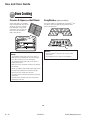
Note: Four seconds after pressing the More+ or Lesspad, the time or temperature will automatically be entered.
If more than 30 seconds elapse between touching a
function pad and the More+ or Less- pad, the function will
be canceled and the display will return to the previous
display.
Clock time cannot be changed when the oven has been
programmed for cook or clean Delay or Cook & Hold.
8
B – 10
16026784
© 2005 Maytag Services