1
Diagnostic Trouble Code(s) (DTC)
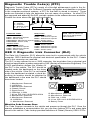
Diagnostic Trouble Codes (DTCs) consist of a five-digit alphanumeric code in the format shown below. When the On-Board Computer recognizes and identifies a problem
in the computer-monitored systems, a DTC for that fault is stored in memory. These
codes are intended to help you determine the root cause of a problem. As new DTCs
are approved and added by the SAE, periodic updates to the software become available.
Consult the store where the tool was purchased.
Bx - Body
Cx - Chassis
Px - Powertrain
Ux - Network Comm.
x = 0, 1, 2 or 3
P0 1 0 1
Specific Fault Designation
Vehicle Specific System
Powertrain Codes
P0xxx - Generic (SAE)
P1xxx - Manufacturer Specific
P2xxx - Generic (SAE)
P30xx-P33xx - Manufacturer Specific
P34xx-P39xx - Generic (SAE)
Chassis Codes
C0xxx - Generic (SAE)
C1xxx - Manufacturer Specific
C2xxx - Manufacturer Specific
C3xxx - Generic (SAE)
Example:
P0101 - Mass or Volume Air
Flow Circuit Range/Performance Problem
Body Codes
B0xxx - Generic (SAE)
B1xxx - Manufacturer Specific
B2xxx - Manufacturer Specific
B3xxx - Generic (SAE)
Network Communication
Codes
U0xxx - Generic (SAE)
U1xxx - Manufacturer Specific
U2xxx - Manufacturer Specific
U3xxx - Generic (SAE)
OBD II Diagnostic Link Connector (DLC)
The Data Link Connector (DLC) allows the scan tool to communicate with the vehicle
computer. OBD II defines the physical and electrical specification for the DLC. Certain
pins in the connector are reserved.
The DLC is also referred to as a J1962 connector, the term taken from a physical and
electrical specification number assigned by SAE (Society of Automotive Engineers). The
J1962 specification defines the location of
the DLC in the vehicle. The DLC should be
located under the dashboard on the driver
side of the vehicle. If the DLC is not located
under the dashboard as stated, a decal describing its location should be attached to
the dashboard in the area the DLC should
have been located.
1- Manufacturer Reserved
2- J1850 Bus+
3- Manufacturer Reserved
4- Chassis Ground
5- Signal Ground
6- CAN High, J-2284
7- K Line, ISO 9141-2 & ISO/DIS14230-4
8- Manufacturer Reserved
9- Manufacturer Reserved
10- J1850 Bus
11- Manufacturer Reserved
8
9
1
16
12- Manufacturer Reserved
13- Manufacturer Reserved
14- CAN Low, J-2284
15- L Line, ISO 9141-2 & ISO/DIS14230-4
16- Battery Power
What the Code Scanner Does
The Code Scanner connects to the vehicle and powers-up through the DLC. Once the
scanner establishes a communication link, you can then retrieve DTCs and erase data
stored in the vehicle. Code Lookup provides definitions of Global (Generic) OBD II DTCs.
3