1
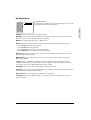
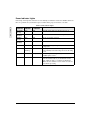
Power Indicator Lights
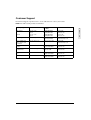
If the Lamp or Temperature indicator is red or flashing red when the ViewSonic PJ700 is turned on,
there is a problem and you should not proceed. Turn off the projector and let it cool down.
Table 3: Power Indicator Lights
E
N
G
L
I
S
H
Power
Indicator
ORANGE
(steady)
GREEN
(flashing)
GREEN
(steady)
ORANGE
(flashing)
RED
Lamp
Indicator
OFF
Temperature
Indicator
OFF
Standby status–indicates that the power is on.
OFF
OFF
The ViewSonic PJ700 is in warm-up mode.
OFF
OFF
Ready for normal operation.
OFF
OFF
The ViewSonic PJ700 is in cool-down mode.
RED
OFF
RED
RED
(flashing)
OFF
RED
OFF
RED (flashing)
RED
OFF
RED
Lamp does not light–lamp failure not related to
temperature.
The lamp is not secure or the lamp cover is not
closed. Firmly reinsert the lamp and secure the lamp
cover.
The cooling fan is not operating–the ViewSonic
PJ700 requires service.
Internal overheating–the ViewSonic PJ700 should
turn off automatically or you should turn-off the
unit. Allow the unit to cool down for 20 minutes.
Make sure the air-filter is clean and the air vents are
clear before preceding.
18
ViewSonic PJ700
Condition