1
Overview
•
1000BASE‐T RJ45 connectors which can be used in a stack configuration or as standard switch ports when the A2H123‐24 is configured as a standalone switch.
On the rear panel, there is a Redundant Power Supply connector for a connection to a SecureStack C2RPS‐SYS power supply system using the appropriate cable (C2RPS‐PSM cable).
Caution: The A2H123-24 is not a PoE-compliant device. Do not connect a SecureStack
PoE Redundant Power System (C2RPS-POE) to the power connector. Otherwise,
damage to the device may result.
Precaución: El dispositivo A2H123-24 no cumple con el estándar PoE (power over
ethernet). No conecte una fuente de poder redundante (RPS) SecureStack PoE (C2RPSPOE) al cable de corriente. De lo contrario, el dispositivo puede dañarse.
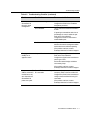
The 10/100 Mbps fixed front panel ports can operate in either half‐duplex or full‐duplex mode, as determined by Auto‐Negotiation.
Note: The 1000BASE-T built-in RJ45 stacking ports 25 and 26 on the A2H123-24 can be
configured as standard 10/100/1000BASE-T switch ports, using the command set switch
stackport, when the unit is used in standalone mode.
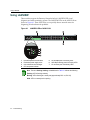
Figure 1-1
A2H123-24 Stackable Switch
A2H123-24
1
2
3
4
5
1-2
Introduction
DB9 RS232 Console port connector
Recessed password reset button
Stack Unit status LEDS
RJ45 port status LEDS
RJ45, 10/100 Mbps ports
6
7
8
9
10
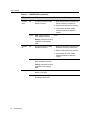
Stack and LC fiber-optic port status LEDs
RJ45 ports for stack connections
LC connector, 100BASE-FX ports
C2RPS-SYS connection
AC power input connector