1
CAUTION
TO PREVENT
ELECTRTC
SHOCKDO NOTUSETHtS(POLARIZED)
PLUG
WITHAN EXTENSION
CORD,RECEPTACLE
OROTHEROUTLETUNLESS
THE BLADESCAN BE FULLYINSERTED
TO PREVENT
BLADE
EXPOSURE.
I N T R O D U C I N GY O U R M O N I T O R
Your new Commodore 1802 color monitor gives you a superior
color picture that enhancesyour computingexperience.This monitor is simpleto hook up to your computerand is easyto adjust.
Pleaseread this brief manual carefully before you try to use your
monitor. The manualshowsyou how to install and usethe monitor
correctly. lt also explains how to use the picture control knobs,
which are like to control knobson a color TV.
Be sureto heedany warningsin this manual,and do NOT removethe
back cover or otherwiseattempt to servicethis monitor. lf you have
problemswith your monitor that are not coveredin this manual.see
y o u r C o m m o d o r ed e a l e ro r a q u a l i fi e d t e c h n i c i a n .
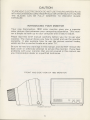
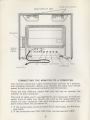
F R O N TA N D S I D EV I E WO F 1 8 0 2M O N I T O R
GE.mdo;l
Illlllllllllllillllllllillllll
P O W E RS W I T C H
rmr
-
v*F
71
..Griss
71