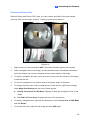
1
2 Access Control Configurations
2.1.2 Through RS-485 Interface
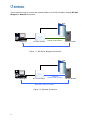
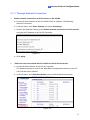
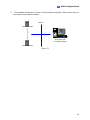
1. Wire GV-CR420 to GV-AS Controller
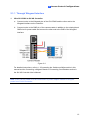
Connect a wire to the RS-485 pins of the GV-CR420 and the other end to the RS-485
interface on the controller.
+12 V
GND
Wiegand D1
Wiegand D0
RS 485 RS 485+
GND
RS 485RS 485+
12V
Camera Reader
GV-AS Controller
Figure 2-5
For detailed instructions, refer to 1.6 Connecting the Cables and Wires earlier in this
manual and the Connecting a Wigand Reader or Connecting Card Readers section in the
GV-AS Controller User’s Manual.
Note: Each camera reader must be connected to a power adaptor instead of using the
power from GV-AS Controller.
15