1
Broadcast Tools® ACS 8.2 Plus Eight Input, Dual Output StereoMatrix Audio Control Switcher
INSTALLATION GUIDELINES
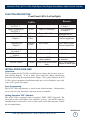
Input Channel Expansion:
Input expansion may be accomplished by connecting a shielded cable between the
first units EXT 1+ input terminal and the second units + unbalanced output (1/2 of
the balanced output). The shield should be connected to the ground terminal.
Follow the same procedure for the EXT +1 right channel. The above example provides 16 inputs, with the first ACS 8.2 Plus providing the main output.
Remote Control:
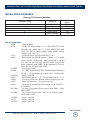
Most front panel functions of the ACS 8.2 Plus may be remote controlled via plug-in
euroblock screw connectors located on the rear panel. The ACS 8.2 Plus accepts
momentary contact closures, open collector or 5-Volt TTL/CMOS logic levels. Open
collector status/tally is also provided and follows the action of the front panel LED’s.
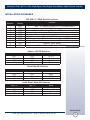
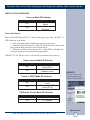
Refer to the connector layout on page 18 of this manual. If the ACS 8.2 Plus is to be
used as a switcher in an automation system, these same inputs (PIP) can monitor external contacts and convert these contacts to serial strings used by most automation systems.
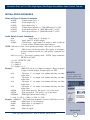
Serial Interface:
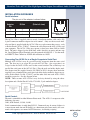
The multi-drop RS-232 transceiver is always in a listening mode unless selected or
the unit ID is zero. In that case, the unit will always leave the RS-232 transceiver
enabled. This is the correct setting for a single unit controlled via RS-232 and the
only way to access the menu.
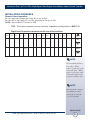
NOTE:
Find step by step
HyperTerminal setup
instructions
at
www.broadcasttools.com
under downloads.
Connecting the RS-232 Serial Port:
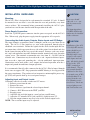
Use the provided modular (S9) 9-pin D-sub connector adapter and reversed modular cable to connect the ACS 8.2 Plus’s serial connector to your serial port.
The multi-drop RS-232 transceiver is always in a listening mode unless selected or
the unit ID is zero. In that case, the unit will always leave the RS-232 transceiver
enabled. This is the correct setting for a single unit controlled via RS-232 and the
only way to access the menu.
SECTION
INSTALLATION
TITLE
e-mail: [email protected] voice: 360.854.9559 fax: 866.783.1742
13