1
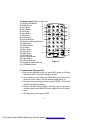
2. Remote Control (Refer to Figure 3)
1) DVD/SD-USB Button
2) Display Button
3) Skip -Button
4) Menu Button
5) Left Button
6) Angle Button
7) Stop Button
8) Setup Button
9) Numeric Buttons
10) Brightness Decrease Button
11) Audio Button
12) Subtitle Button
13) Up Button
14) Skip+ Button
15) Enter Button
16) Right Button
17) Down Button
18) Play/Pause Button
19) Zoom Button
20) A-B Repeat Button
21) Brightness Increase Button
22) 1-All Repeat Button
Figure 3
F. Loading and Playing a Disc
a. After connecting power to the unit, set the DVD player to ON using
the power switch. The power indicator will light.
b. Open the disc tray by sliding the OPEN switch in the direction of
the arrow. Place a disc in the tray with label side facing up.
c. Close the tray by pressing the area marked “PRESS” . The unit will
load the disc and start playing.
d. Rotate VOLUME control to adjust the DVD player’s volume.and
use the remote control BRIGHT button to adjust the LCD’s brightness .
e. To stop playing a disc, press STOP.
8
PDF created with FinePrint pdfFactory Pro trial version http://www.fineprint.com