1
Welcome to
Toshiba
Welcome to Toshiba
Congratulations! You have purchased one of the finest color TVs on the
market. The goal of this manual is to guide you through setting up and
operating your Toshiba TV as quickly as possible. Please make sure
you’ve received the following items: TV, remote control, batteries,
manual, registration card, and extended service plan literature. If you
did not receive all of the items, or any of the items are damaged or
broken, please contact your Toshiba dealer. In addition, you may need
to purchase other audio or video cables to connect your equipment.
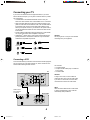
See “Connecting your TV” on page 4 for more information.
Please read all the safety and operating instructions carefully before
you begin.
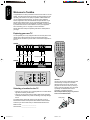
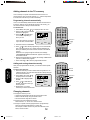
Exploring your new TV
You can operate your TV by using the buttons on the front panel or the
remote control. All the terminals on the front and the back panel
provide all the connections you will need to connect other equipment to
your TV.
POWER
20AF41
POWER
CHANNEL
AUDIO
VIDEO 3 L/MONO R
VOLUME
TV
VCR
CABLE
CH RTN
PHONES
1
2
3
ENT
4
5
6
100
7
8
9
0
CH +
VOL
+
VOL
–
Remote Sensor
POWER
MENU/
ENTER
Phones
Volume
Audio(L/R)/Video In
Channel
CH –
EXIT
24AF41
RECALL TV/VIDEO
RESET CAP/TEXT
POWER
CHANNEL
1/2
CODE
MTS
SLEEP
REW
PLAY
TV/VCR
STOP
REC
IN
MUTE
FF
PAUSE/STILL
VCR CH
OUT
VIDEO
VIDEO
ANT (75Ω)
Y
L/MONO
S-VIDEO
L/MONO
PB
AUDIO
R
VIDEO 1
VIDEO 2
PR
AUDIO
R
Selecting a location for the TV
• Place the TV on the floor or on a sturdy platform in a location where
light does not directly hit the screen.
• Place the TV far enough from the walls to allow proper ventilation.
Inadequate ventilation may cause overheating, which may damage
the TV.
Caution:
The plug has one prong wider than the other
and will fit only one way into a standard
electrical outlet (120 volt AC, 60 Hz). If the
plug does not fit into the outlet, try turning it
around. If the plug still does not fit, the outlet
is probably non-standard and must be
replaced by a qualified electrician.
Do not tamper with the plug or try to force
it into a non-standard outlet.
wide prong
The model number and serial number are on the back of your TV.
Record these numbers in the spaces below. Refer to these numbers
whenever you communicate with your Toshiba dealer about this TV.
Model number: _____________________
Serial number: ______________________
2
FAV
VOLUME
VIDEO-3 IN
3I70401D P01-03
FAV
16/08/2001, 15:57