1
QT-CD131/131C
CD SECTION
Since this CD system incorporates the following automatic
adjustment function, when the pickup is replaced, it is necessary
to reajust it.
Since this CD unit does not need adjustment, the combination
of PWB and laser pickup unit is not restricted.
TEST MODE
Start
Note
Operation
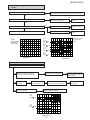
While holding down the "STOP" button, move the FUNCTION/POWER switch to "CD".
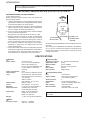
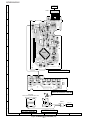
Then, release the "STOP" button and, within 0.5 second, connect the TEST POINT to GND (within 0.5 second).
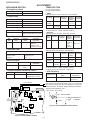
(See Fig. 7)
1. When the CD LID switch is in the OFF position, the unit will be able to enter the test mode.
However, playback cannot be performed in this mode.
2. You can only move the pickup.
3. The LCD display should be the same as it is for normal CD operations.
1
The use of the "UP/CUE" button will move the pickup to the outermost position.
The use of the "DOWN/REVIEW" button will move the pickup to the innermost position.
2
When the "PLAY" button is pressed, the laser will be lit, and when the "STOP" button is pressed, it will be
turned off. Playback will also start and stop when these buttons are pressed.
a. If the "PLAY" button is pressed while in the stop mode, the laser will simply be turned on at first.
b. If the laser is lit and the "PLAY" button is pressed again, playback will start from the current pickup position.
c. If the "STOP" button is pressed, playback will stop. When pressed again, the laser will be turned off.
3
Turning the tracking servo on or off.
a. Each time the PAUSE button is pressed during playback, the tracking servo will be turned on or off.
(Note: If the PLAY button is pressed while in the stop mode, the tracking servo will automatically be
turned on.)
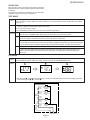
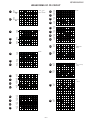
LCD MODE
Start
Display
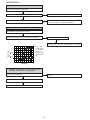
While holding down the "STOP" button, move the FUNCTION/POWER switch to "CD".
Then, release the "STOP" button and, within 0.5 second, press the REVIEW/DOWN button.
2
1
1 second
3
3
1 second
12
3
* After the number has appeared in the display, each time the "UP/CUE" button is pressed, the display will switch
in the following order: , , and then .
SWITCH PWB – A2
R771
3.9K
SW774
TRACK DOWN/
REVIEW
R772
2.7K
SW773
TRACK UP/
CUE
TEST
POINT
R773
1.8K
R774
1.5K
R776
10K
SW771
PLAY
SW7712
STOP
+B
3
1
TO CD SECTION
Figure 7
–7–