1
Security Technical Overview
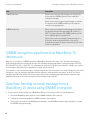
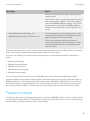
Protecting the data that the BlackBerry Device Service stores in your organization's environment
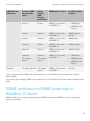
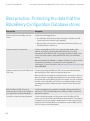
Best practice: Protecting the data that the
BlackBerry Configuration Database stores
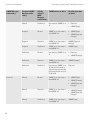
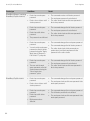
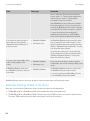
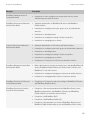
Best practice
Description
Audit connections to the Microsoft SQL
Server.
Consider the following guidelines:
Delete unsecured, old setup files.
•
At a minimum, write failed connection attempts to the Microsoft SQL
Server log file and review the log file regularly.
•
When possible, save log files to a different hard disk drive than the one
that the data files are stored on.
Consider deleting Microsoft SQL Server setup files that might contain
plaintext, credentials encrypted with weak public keys, or sensitive
information that the Microsoft SQL Server logged to a Microsoft SQL Server
version-dependent location during the Microsoft SQL Server installation
process.
Microsoft distributes the Killpwd tool, which is designed to locate and delete
passwords from unsecured, old setup files in your organization’s
environment. For more information, visit www.support.microsoft.com to read
article KB263968.
Limit the permission level of the Microsoft
SQL Server.
Consider associating each Microsoft SQL Server service with a Windows
account that the service derives its security context from.
Microsoft SQL Server permits the sa account and, in some cases, other user
accounts to access operating system calls based on the security context of
the account that runs the Microsoft SQL Server service. If you do not limit the
permission level of the Microsoft SQL Server, an attacker might use these
operating system calls to attack any other resource that the account has
access to.
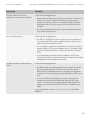
Make the Microsoft SQL Server port
numbers that are monitored by default on
your organization’s firewall unavailable.
Consider configuring your organization’s firewall to filter packets that are
addressed to TCP port 1433, addressed to UDP port 1434, or associated
with named instances.
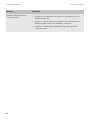
Protect the sa account using a password.
Consider assigning a password to the sa account on the Microsoft SQL
Server, even on servers that require Windows authentication. The password
is designed to prevent an empty or weak password for the sa account from
being exposed if an administrator of the database resets the Microsoft SQL
Server for mixed mode authentication.
118