1
Security Technical Overview
Managing app availability on devices
Managing app availability on
devices
10
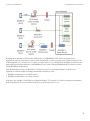
You can use the BlackBerry Device Service to install and manage work apps in the work space on devices. Work apps can
only access work data and interact with other work apps.
A work app can be either an internal app or a public app available from the BlackBerry World storefront. You can add an
internal app to the BlackBerry Device Service by specifying the .bar file using the BlackBerry Administration Service. The
BlackBerry Device Service then adds the internal app to your organization’s shared network folder.
You can specify the internal work apps that you want to install, update, or remove, and you can specify whether internal
apps are required or optional on devices. You can also specify the BlackBerry device models that support an internal app
so that the app is installed only on compatible devices. If you specify that an app is required, the app is automatically
installed on the device and the user cannot remove it.
For BlackBerry 10 devices, you can also specify apps that are available to the public in BlackBerry World as optional work
apps. If you specify a public app as an optional work app, the app becomes available to the user in the Public Apps tab of
the BlackBerry World for Work storefront and the user can choose to install the app. Public apps that are specified as
optional work apps cannot be required.
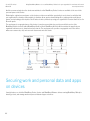
BlackBerry Balance devices (excluding BlackBerry PlayBook tablets) can have the same app installed separately in the
work space and the personal space. Each instance of the app is kept separate from the other and each operates under the
rules and restrictions that apply to the space that it is installed in. The apps can be configured, upgraded, or removed
independently, and changes to one instance have no effect on the other instance. For example, an instant messaging app
installed in the personal space might be restricted from adding work contacts, while the same instant messaging app
installed in the work space does not have that restriction.
App developers can use various development tools to create, test, and package apps so that you can install them on the
devices in your organization's environment. For more information about the development tools, visit www.blackberry.com/
developers.
Note: The work space on devices does not support BlackBerry Runtime for Android apps.
Related information
Managing work apps using the BlackBerry World for Work storefront, 54
BlackBerry World for Work, 78
How work apps are installed on a BlackBerry PlayBook tablet, 72
83