1
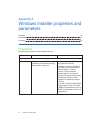
APPENDIX A
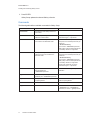
Windows Installer properties and parameters
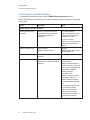
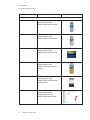
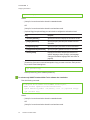
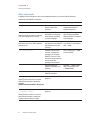
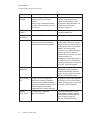
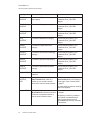
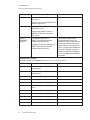
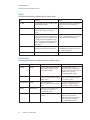
Property
Allowed values
Notes
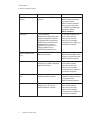
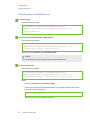
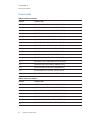
MATH_PROD_
KEY
[String]: The 22- or 25-character
product key for SMART Notebook
Math Tools software you received
from SMART.
This property automatically appears in
the Product Key box in the activation
wizard if you choose not to include the
ACTIVATE_LICENSE property.
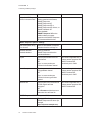
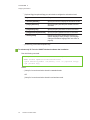
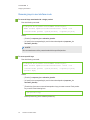
ENABLE_MR_
TRIAL
1: Install 3D Tools for
SMART Notebook software.
If you include the ENABLE_MR_
TRIAL property, Windows Installer
installs SMART Notebook software
even if you don’t include the
INSTALL_NOTEBOOK property.
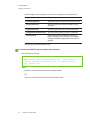
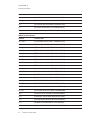
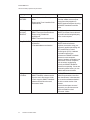
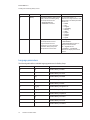
MIXED_PROD_
KEY
[String]: The 22- or 25-character
product key for 3D Tools for
SMART Notebook software you
received from SMART.
This property automatically appears in
the Product Key box in the activation
wizard if you choose not to include the
ACTIVATE_LICENSE property.
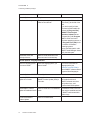
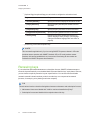
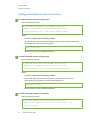
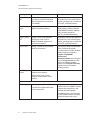
INSTALLDIR
[String]: The path to your preferred
folder for the software.
If you specify a folder, include a back
slash (\) at the end of the path.
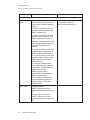
If you don’t specify a folder, Windows
Installer installs the software in
[Program files]\SMART
Technologies\
Education Software where [Program
files] is C:\Program Files for 32-bit
versions of Windows operating
systems or C:\Program Files (x86)
for 64-bit versions of Windows
operating systems.
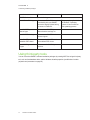
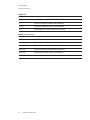
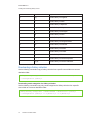
DESKTOP_
ICONS
1 (default): Include shortcuts to the
software on the desktop.
[Empty string]: Don’t include
shortcuts to the software on the
desktop.
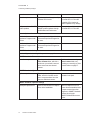
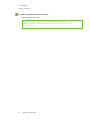
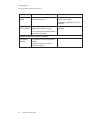
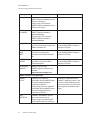
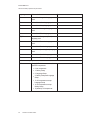
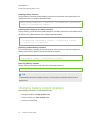
SPU properties
INSTALL_SPU
1 (default): Install SPU in Full mode.
2: Install SPU in Dashboard mode.
0: Don’t install SPU.
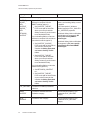
In Full mode, users can view the
installed versions of SMART software
as well as their product keys, and
download and install updates.
In Dashboard mode, users can view
only the installed versions of SMART
software and their product keys.
47
smarttech.com/kb/170627