1
2
Contents
Contents
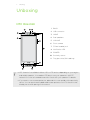
Unboxing
HTC One mini
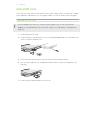
microSIM card
7
8
Charging the battery
10
Switching the power on or off
10
Want some quick guidance on your phone?
11
Setting up your phone
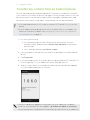
Setting up your new phone for the first time
12
Transferring content from an Android phone
13
Transferring content from an iPhone
14
Transferring contacts from your old phone through Bluetooth
14
Getting contacts and other content into HTC One mini
15
Transferring photos, videos, and music between your phone and computer
15
Home screen
16
Getting to know your settings
16
Updating your phone's software
17
Your first week with your new phone
About your phone
Basics
18
20
Home screen feeds
28
Notifications
30
Working with text
32
Battery
36
Camera and Gallery
Camera
40
Gallery
45
Personalizing
Making HTC One mini truly yours
55
Changing your wallpaper
55
Adding a widget to your Home screen
55
Adding apps and other shortcuts on your Home screen
57
Rearranging or removing widgets and icons on your Home screen
57
Personalizing the launch bar
58
Grouping apps into a folder
58
Adding a Home screen panel
59
Changing your ringtone, notifications, and sounds
60