1
8
Unboxing
microSIM card
HTC One mini uses a microSIM card. The microSIM card contains your phone number,
service details, and memory for storing phonebook contacts and/or text messages.
Inserting the SIM card
Use a standard microSIM only. Inserting other types (such as nanoSIM with an
adapter or a modified SIM) may cause the card to not fit properly or damage the
card slot.
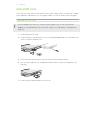
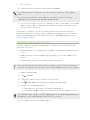
1. Hold the phone face up.
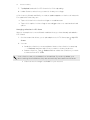
2. Insert the tip of the SIM eject tool (or a small bent paperclip) into the small hole
next to the SIM card tray slot.
3. Push the tip all the way into the hole until the SIM card tray ejects.
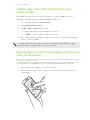
4. Pull the SIM card tray out, and place the SIM card (contacts facing down) into
the tray.
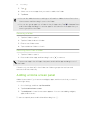
5. Insert the SIM card tray back into the slot.