1
Appendix F - Monitor Output
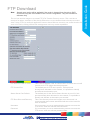
Open a File Transfer Protocol (FTP) client to connect to the unit, refer to the FTP client’s supporting
documentation for guidance on how to connect to the unit.
Note: The URL of the unit will be required before a connection can be made.
No username/password is required for an FTP connection by default. If they have been assigned
however, these must be entered before access will be allowed. FTP access username/passwords
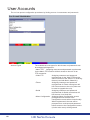
can be configured via the ‘Admin FTP’ option displayed in the ‘User Accounts’ menu (Display menu>User Accounts).
When access to the unit has been granted, navigate to the ‘etc’ folder.
Within this folder, located the voutconfig.example.ini file.
Rename it to voutconfig.ini and reset the machine. This will provide more default screen options
which may better suit the monitor in use.
If this does not provide a better alternative, contact Technical Support.
166
166
HD NetVu Console