1
Quick Start Guide — MDA EQ Series, cont’d
Table of Contents
Chapter 1 • Introduction .......................................................... 1-1
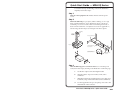
Smooth
About this Manual ................................................................ 1-2
About the MDA EQ Series Mini Distribution
Amplifiers .................................................................................. 1-2
Ridges
A
A
SECTION A–A
Power Supply
Output Cord
Models .................................................................................... 1-2
Features .................................................................................. 1-2
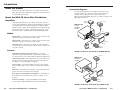
Connection diagrams ............................................................ 1-3
Tie Wrap
0.3” (7 mm) MAX
Chapter 2 • Installation and Operation ........................ 2-1
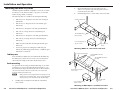
Mounting the MDA EQ Series ......................................... 2-2
Orange Captive Screw
Connector
Wiring the power cord
Step 4
Connect power cords to the input and the outputs, and turn on the
equipment.
Step 5
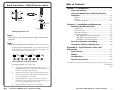
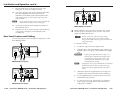
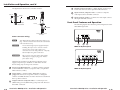
Adjust the potentiometers for the outputs, using an Extron Tweeker.
If using very short output cables, set all potentiometers to the
default setting (the arrow on the potentiometer pointing to the
dot beside it; see the illustration below).
1
GAIN
2
EQ
GAIN
3
EQ
GAIN
4
EQ
GAIN
EQ
Potentiometers at default settings
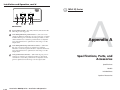
If using long cables, follow these steps:
QS-2
a.
Supply the Color Bars test signal to the input. (It is
recommended that you use an Extron VTG 300 Video Test
Generator to generate the test signal.)
b.
Adjust the Gain pot for output 1 until the signal level at
the far end is the same as the input (or the display shows
the correct brightness and contrast).
c.
Adjust the EQ pot for output 1 so that no overshoot or
round front corner appears at the far end on the scope (or
you see a sharp picture with no smearing).
d.
Repeat steps b and c for the rest of the outputs.
VersaTools® MDA EQ Series • Quick Start Guide
Tabletop use ........................................................................... 2-2
Rack mounting ....................................................................... 2-2
Furniture mounting ............................................................... 2-4
Projector mounting ............................................................... 2-5
PMK 100 Mini Projector Mounting Kit ........................... 2-5
PMK 300 Projector Mounting Kit .................................... 2-6
PMK 350 Projector Mounting Kit .................................... 2-8
Rear Panel Features and Cabling ................................. 2-10
Front Panel Features and Operation .......................... 2-13
Appendix A • Specifications, Parts, and
Accessories ........................................................................................ A-1
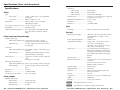
Specifications ......................................................................... A-2
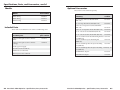
Models ........................................................................................ A-4
Included Parts ......................................................................... A-4
Optional Accessories ........................................................... A-5
All trademarks mentioned in this manual are the properties of their respective owners.
68-978-01 Rev B
07 06
VersaTools® MDA EQ Series • Table of Contents
i