1
Getting The Right Angle
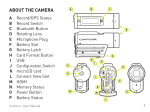
The ContourGPS also features a rotating bezel that allows you to turn the lens 180 degrees
so your video image is right side up even if your camera is mounted sideways. The barrel
of the camera displays arrows at the 9 o’clock, 12 o’clock, and 3 o’clock positions for
reference. You may find the bezel is a bit tight to rotate, but don’t be afraid to use a bit
of force – our cameras are tough! You might also notice some play in the bezel at the 12
o’clock position. This is normal and will not affect your videos.
Recording
With the camera powered up and ready to record, push the record slider [B] on the top of
the camera all the way forward. You’ll hear a single beep and the record status LED will
turn red. You’re now recording.
To stop recording, push the slider back to its original position. You’ll hear two beeps and
the record LED will turn to green. Congratulations, you’ve just made your first video clip
with the ContourGPS!
To make another video clip, just push the record slider forward again. You can continue to
record as many clips as you’d like until the microSD card gets full or the battery runs out.
microSD Card Formatting
Your ContourGPS comes with a 2GB microSD card that is pre-formatted. This card has
enough room for about 30 minutes of video of 1080p resolution recording. If you have
purchased a higher capacity microSD card, you need to format it properly to work in your
ContourGPS. Here is how to format a microSD card:
1. Power off the camera.
2. Remove the microSD card from the camera.
2. Power up the camera with the microSD card removed. The camera will TRIPLE beep and
the SD card LED on the lower rear of the camera will flash red. The front record LED will
flash red/yellow. This indicates that the SD card is missing.
3. With the camera still powered up, insert the microSD card.
4. Using a pin or small nail, push and hold down the pinhole formatting button [F] located
above the SD card slot. The camera will beep once when the format is complete. This
process generally takes no more than 10 seconds.
5. Release the pinhole button only after the camera beeps.
6. Power off the camera by holding down the power button for 3-5 seconds.
7. Power up the camera. It should boot normally and be ready to shoot video.
The general rule of thumb is you get up to 15 minutes of video per GB of card capacity. An
8GB card will store up to 2 hours of video. The ContourGPS can utilize any speed class of
microSD card. However, the camera only benefits from card speeds up to class 6.