1
About the GPS Feature
The GPS module of your ContourGPS has an accuracy rating of +/-10m for latitude and
longitude coordinates. In order to track your location data, the GPS module must first obtain
a position lock by establishing communication with four GPS satellites. Position lock status is
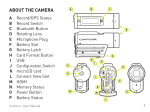
communicated by the front LED of the camera [A]. A flashing front LED (either red or green)
indicates the GPS module has not obtained a position lock. A solid front LED (either red or
green) indicates that a position lock has been obtained and the GPS module is logging GPS data
while video is being recorded.
It generally takes somewhere between one and five minutes to obtain a position lock under
good conditions. Several environmental factors could impact the ability for your ContourGPS to
obtain a position fix. These can include any of the following.
1. An obstructed view of the horizon. The more of the horizon that is visible, the better the
chance of obtaining the four satellite signals required to establish a position lock.
2. Camera mount position. The antenna of the camera is located in the record slider. If the
camera is mounted on its side, the antenna will have a limited view of the horizon. For best
results, mount the camera upright with the GPS antenna level and facing upwards.
3. Any obstruction over the GPS antenna (record slider of the camera) may inhibit obtaining a
signal lock. Even a hand placed over the record slider may adversely impact performance.
4. In “urban canyons”, GPS signals often bounce off of tall buildings and can increase position
error or affect the ability to obtain a position lock.
5. Other electronic equipment placed in close proximity to the camera may interfere with the
GPS signal and result in either an inability to establish a position lock or inaccurate readings.
If your camera has issues obtaining a GPS lock, please do the following:
1. Check to see that the camera’s battery is well charged. The camera’s ability to establish and
maintain position lock is significantly diminished if the battery’s capacity is depleted. You can
test the capacity of your battery by quickly pressing and releasing the power button while the
camera is powered on. The battery indicator LED on the top rear of the camera should glow
green if the battery has ample capacity.
2. Verify that your camera’s GPS module is active. The GPS module can be manually deactivated though Contour’s StoryTeller software. As a verification that the GPS module is active,
the front record LED should blink for at least 5-10 seconds when the camera is powered on.
If it does not, GPS may be de-activated on the camera for that switch position (1-2 switch).
To activate the GPS module, connect the camera to a computer with a USB cable, launch
StoryTeller, and click on the camera’s SD card volume label name under “Device” on the left
side of the main StoryTeller screen so it is highlighted. Using the menu bar, then navigate to
Camera -> Configure Camera. Set “GPS Power” to “On”.
3. Make certain you are outdoors, have a relatively unobstructed view of the horizon, and that
the camera is upright and level with nothing on top of the record slider.