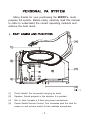
1
(5)
Power Indicator: Red light illuminates when power is turned on to
denote normal power status.
(6)
Charging Indicator:
Red light indicates the battery is weak and needs charging.
Charging takes minimum 4 hours.
Green blinking light indicates charging is in progress.
Solid green light indicates the battery is fully charged.
This system is equipped with auto cut-off charger. When
battery is weak (red light), power will cut-off automatically to
avoid any damages that could cause by power over-drain.
(7)
Auxiliary Input Jack: Uses 3.5mm "minijack" plug. Accepts
external audio inputs, such as portable cassette and CD players.
(8)
DC Power Input Jack: Plug into DC charger (supplied) for battery
charging. The inner conductor is positive and should be
connected to 18VDC 10%, +2.5A.
(9)
Body: Houses all electronic components.
(10)
Shoulder Carry Belt: May be stored inside the Battery
Compartment.
(11)
Battery Compartment: The rechargeable battery is located behind
the battery compartment door.
(12)
Microphone Stand Mount: For convenient mounting on a standard
35mm threaded microphone stand.
(1)
Personal PA System and wire microphone use :
a) Plug the 6.3mm connector into Mic-in jack (3) and connect
XLR
Jack into the wired mic. Turn switch/volume knob(4) clockwise
to the right. when LED(5) indicator light is red, then the unit is
on.
b) Power on wire transmitter.
c) Adjust volume level (4) clockwise to desired loudness.
-2-