1
Platform: DBALL/DBALL2
Firmware: LINCOLN Remote Start Ready Installation
Rev.: 20120112
Page 9
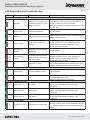
LED Diagnostics and Troubleshooting
LED
Status
Description
Troubleshooting
This can also mean there is an issue with the data bus
wiring. Make sure the connections to the data bus are
correct by referring to the wiring diagram.
Note: You can press the programming button 5 times to
skip this step.
Module Programming
Solid
Solid Red
Waiting on the completion of a
programming sequence, or the
ignition is turned on.
Flashes
Flashes Green
Statuses are supported.
Normal operation.
Flashes
Flashes Red
CAN statuses are NOT detected.
The CAN wires may be incorrectly connected or wrong
vehicle CAN Bus is used.
Flashes
Flashes Orange
A skip sequence has been
detected.
Used for diagnostic purpose only. By pressing the
programming button 5 times, some programming
detection sequence will be skipped and some
functionnality might not work.
Solid
x3 secs
Solid Green x3
seconds
Module has been successfully
programmed.
Normal operation.
Solid
x3 secs
Solid Orange x3
seconds
Module has been successfully
programmed, but one or more
steps were skipped.
Off
Off
Module has no power.
Used for diagnostic purpose only. By pressing the
programming button 5 times, some programming
detection sequence will be skipped and some
functionnality might not work.
Make sure the D2D harness is connected or that the 12
Volt is present between the red and black wires. If the
12 Volt is present, the module may be defective.
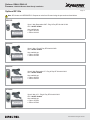
Active Ground While Running
Flashes
Off
Flashes green
Off
Ground out (GWR) is active
Normal operation.
N/A
The Ground While Running (status) wire is incorrectly
connected. Refer to the wiring
diagram to make the right connections.
Inactive Ground While Running
Flashes x1
Flashes green 1x
Lock feature.
Flashes x2
Flashes green 2x
Unlock feature.
Flashes x3
Flashes green 3x
Trunk feature.
This can also mean there is an issue with the wiring.
Refer to the wiring diagram to make the right
connections.
This can also mean there is an issue with the wiring.
Refer to the wiring diagram to make the right
connections.
This can also mean there is an issue with the wiring.
Refer to the wiring diagram to make the right
connections.
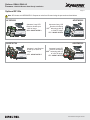
Remote Start Ready (RSR)
Flashes x7
Flashes red 7 times
Vehicle will not remote start.
The RFTD Output needs to be enabled to start the
vehicle in RSR mode. It can be enabled form the web
on the flashing page, or in the Feature Programming
table.
© 2012 Directed. All rights reserved.