1
Conventions Used in this Guide
Notifications
Contents
The following are used:
WARNING:
Potential risk of severe injury or death.
AVERTISSEMENT: Risque potentiel de blessure grave ou de mort.
ATTENTION:
• Risk of property damage.
• Risque de dommages matériels.
NOTE:
A note draws attention to important information.
Software Commands
Commands are written in the fonts shown here:
^AR Merge Scene,,Op1 scene 1,1 ^B 51 ^W^C
[01] R 0004 00300 00400 00800 00600 [02] 35 [17] [03]
E X! *X$* Y3%* Y3&* Y3^ CE}
NOTE: For commands and examples of computer or device
responses mentioned in this guide, the character “0” is used for
the number zero and “O” is the capital letter “o.”
Computer responses and directory paths that do not have variables are
written in the font shown here:
Introduction.................................. 1
Remote Control........................... 13
About this Guide............................ 1
About the FOX Matrix Switchers.... 2
Configurability and
Transmission Modes................. 3
Selected SIS Commands............. 13
Command and Response
Table for SIS Commands........ 14
Matrix Switchers Control
Program...................................... 16
Installing the Program.............. 16
LAN Port Connection............... 17
Starting the Program................ 17
Built-in HTML Pages.................... 19
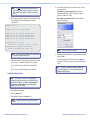
Configuring for Network
Communication....................... 19
Loading the Start-up Page....... 20
Installation.................................... 5
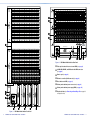
Rear Panel...................................... 5
A Note on I/O Boards................. 5
Making Connections.................. 8
Front Panel................................... 10
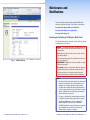
Maintenance and Modifications..... 23
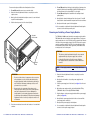
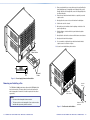
Removing and Installing
an I/O Board or Blank Panel....... 23
Removing and Installing
a Power Supply Module............. 25
Removing and Installing a Fan..... 26
Reply from 208.132.180.48: bytes=32 times=2ms TTL=32
C:\Program Files\Extron
Variables are written in slanted form as shown here:
ping xxx.xxx.xxx.xxx —t
SOH R Data STX Command ETB ETX
Selectable items, such as menu names, menu options, buttons, tabs,
and field names are written in the font shown here:
From the File menu, select New.
Click the OK button.
Specifications Availability
Product specifications are available on the Extron website,
www.extron.com.
FOX Matrix 320x and FOX Matrix 14400 • Contents
v