1
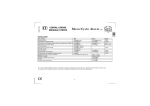
CompuGLO color LCD
The remote-pager comes with CompuGLO which is a unique color LCD display
that visually tells the vehicle owner the security status of your car at all times.
There are differing icons that will appear on your CompuGLO LCD indicating
what your vehicle is currently doing.
Auto
Turbo
Icon
Auto
Turbo
Timer
Passive
Hammer
Remote
Vibration
Zzzz
Parking Lights
Car Siren
Phone
Lock/Unlock
Transmitting
Timer
Passive
Explanation
Indicates if the Auto Arm/Disarm mode is on or off.
IndicateS if Turbo Mode is on or off.
Indicates if Timer Start Mode is on or off.
Indicates if Passive Arming Mode is on or off.
Indicates that the first or second stage shock sensor has been
triggered.
Indicates that Shock sensor is by-passed or not.
Indicates if you are in Valet Mode.
Indicates if your car parking lights are flashing.
Indicates that your car siren is turned on or off when you lock or
unlock the vehicle.
Indicates that someone is paging you from your vehicle.
Displays if your car is armed or disarmed.
Indicates if your remote-pager is transmitting signals to the
controller unit.
© 2001 Firstech, Inc. Page 4