1
2.1 Unpacking Your Network Adapter
Your package should contain the following items:
Adapter Card
Driver disk
BNC T-connector
User's Guide
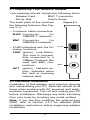
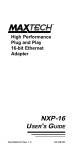
The back plate of the card has
the following features (See Figure 2-1):
Figure 2-1
• 2 network cable connectors:
RJ45 Connector
for
10BASE-T networks
BNC Connector
for
10BASE-2 networks
• 2 LED indicators with the following functions:
LINK
ACT
LINK (green) - Link Status.
The card is successfully connected to a
10Base-T network. Not
used with BNC connections.
RJ-45
BNC
ACT (green) - Network activity. Indicates when
the card is receiving
network data.
2.2 Hardware Installation
Installation of this adapter card requires opening
and manipulating your PC. Exercise caution at all
times when working with AC powered and staticsensitive equipment. Turn off and unplug your PC
before installation. Discharge any static electricity
from your body by touching any metal surface.
Note: If you are also installing the optional boot
ROM, refer to Section 2.2.1 for detailed ROM
installation instructions before beginning adapter
installation.
2