1
MAKING COPIES
This chapter describes basic copying functions and some other copying functions using the
bypass tray.
NORMAL COPYING
2
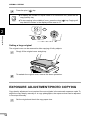
Making copies
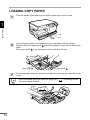
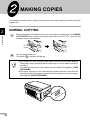
Ensure that paper of the desired size is set in the paper tray. See page 10, LOADING
COPY PAPER. When copying onto paper larger than A4 (8-1/2" x 11") size, pull out
the paper output tray extension.
Turn the power switch on.
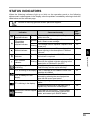
The ready (
) indicator will light up.
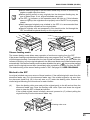
The copier will enter a power save mode once the set time has elapsed
without any copier operation after the last copy of a run is made or power is
turned on.
The settings of the power save modes can be modified. See page 20, USER
PROGRAMS.
● The copier will return to the initial settings a preset amount of time after the
last copy is made. The preset amount of time (auto clear time) can be changed.
See page 20, USER PROGRAMS.
●
12