1
Sequencing
How to do Number Sequencing using Word and Excel.
Sequencing is most commonly used to increment a numeric value to be used in labels for wire
wrapping. You can use of an Excel spreadsheet template as well as a Word template (included
on your installation CD):
1. Open an existing template from the DuraLabel CD or start a new Word document.
2. Because Excel uses Pixel measurement instead of inches, you will want to set this
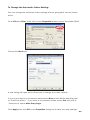
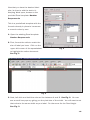
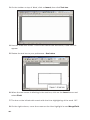
to match in Word. Go to Tools menu >>> Options to bring up the property sheet
for Word. Click on the General tab, and locate the option to change the unit of
measure. See Fig. 1. Change it to Point as this is the same as pixel
(1" = 72 points, 2" = 144 points, 3" = 216 points, 4" = 288 points, etc.)
Fig. 1
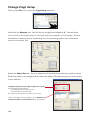
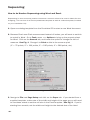
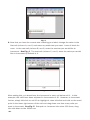
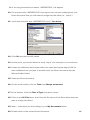
3. Next go to File >>> Page Setup and click on the Paper tab. If you started from a
supplied template, make note of the width and height of the page as you will need
to use these values to set the cell size in the Excel template. See Fig. 2. If you're
starting from scratch, set the width and height to the desired size of the label.
-40-