1
Contacts App
Searching for a Contact
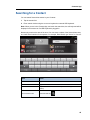
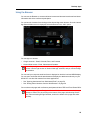
You can search first and last names in your Contacts.
1.
Tap the search field.
2.
Enter search criteria using the on-screen keyboard or external USB keyboard.
Note: When you are in the Contacts App, and touch the search box, the soft keyboard will be
displayed in all cases even if a USB keyboard is plugged in.
Names only match at the start of the word. You can enter a subset of the first and last name,
and it will find all matches for that pattern, for example, David Smith, type "da sm" or "sm da".
Task
Action
Search on first name
Type letters of first name
Search on last name
Type letters of last name
Edit search criteria
Tap search box and the on-screen keyboard returns (or press the clear
button)
To exit search mode
Press the back key
45