1
SuperLoader 3 Quick Start Guide
4 Verify that the total current of all rack mounted components (including the
autoloader) will not exceed the current rating of the power distribution unit or
outlet receptacles.
5 Secure the help of at least one other person. At least two people are required to
safely install the autoloader into a rack cabinet.
WARNING: Failure to take these safety steps may result in personal injury or
equipment damage.
Caution: Do not remove the top cover of the autoloader during the installation
process. Removing the top cover could result in damage to the autoloader.
Unpacking the Autoloader
Before you begin, clear a desk or table so that you can unpack the autoloader.
The Quantum SuperLoader 3 Quick Start Guide has all the necessary information to
unpack and inspect your autoloader correctly.
You also need to select an open 2U computer rack location near the server that will host
the autoloader.
Caution: If the room in which you are working differs from the temperature in which
the autoloader was shipped or stored by 15° C (30° F) or more, let the
autoloader acclimate to the surrounding environment for at least 12 hours
before removing it from the shipping carton.
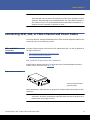
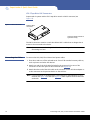
Caution: If your unit was ordered as a one-magazine autoloader, be sure to remove
the plastic shipping insert from the magazine bay before connecting or
operating your autoloader. Insert either a magazine or a magazine blank
into the bay. The autoloader will not function without both magazine bays
equipped with either a magazine or a magazine blank.
Carefully unpack and inspect your new Quantum SuperLoader 3 by doing the following:
1 Inspect the shipping box for damage. If you notice any damage, report it to the
shipping company immediately.
2 Open the shipping box and remove the accessories package. Set the accessories
package aside for now.
3 Lift the autoloader and padding out of the box and place it on the work surface, top
facing up. Do not set the autoloader on either end or sides.
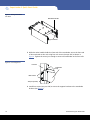
4 Carefully remove the shipping padding from the left and right sides of the
autoloader. Then remove the bag from the autoloader.
4
Unpacking the Autoloader