1
Firewire Cable Installation
Attach the FIREWIRE-IDE cable’s “MC 36 Connector” to your Addonics
Pocket UDD firm and securely – you should not be able to disconnect the cable
without pressing the release notch.
Firewire Pocket UDD Installation
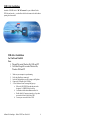
For Win98SE, Me, 2000 and XP
Make sure your computer is up and running
1. Verify that all cables are connected.
2. Insert the Flash card that you will be using to the Digidrive.
3. Connect the Firewire connector to the Firewire Port.
(Note for Win98SE only: After plugging in the cable some system might
prompt you for Win98SE CD, in case you don’t have The Win98SE CD and the
wizard prompt you for:
NTMAP.SYS please type C:\WINDOWS\SYSTEM32\DRIVERS
NTMAPHLP.PDR please type C:\WINDOWS\SYSTEM\IOSUBSYS
IF the system did not prompt you for anything just follow the steps below)
1.
2.
3.
4.
5.
6.
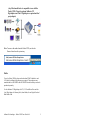
Make sure the Firewire cable is securely attach from the back of the drive.
Power on the system, on the Window Desktop, double click on the
MY COMPUTER icon.
Plug the Addonics Six Pin FIREWIRE-IDE connector into your computer’s
FIREWIRE port if the computer has a Six Pin Female Firewire port.
Wait for a few seconds, your computer may blink for a moment as well.
Double Click on the “My Computer” icon if not open yet. Your Pocket
UDD will appear as a drive icon.
You are now ready to use the Pocket UDD.
Addonics Technologies – Pocket UDD Users Guide v1.0
7