1
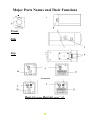
1. Focal Length Adjustment Ring
Use this ring to adjust the appropriate focal length according to
the lens type. Rotate the ring clockwise for a CS-mount lens;
rotate the ring counterclockwise for a C-mount lens. The
factory setting is C-mount.
2. Lens Mount
Used to mount an appropriate C-mount or CS-mount lens.
3. Locking Screw
Use the locking screw to set the focal length.
4. Lens Connector (4 pin socket)
Connect to the lens plug of the auto iris lens.
5. Control Switches
There are six (6) control switches located on the sideboard.
These are used to set the special features. The switches in order
are for Flicker less, Back Light Compensation, Electronic
Shutter, Automatic Gain Control, Line-Lock and Auto Iris Lens
type.
Fluorescent On/OFF
This is a function compensates for the flickering images that can
occur in fluorescent light conditions. When filming images in
fluorescent lighting, turn on the Fluorescent function; the default
setting is off.
BLC (Back Light Compensation) On/Normal
When BLC is turned on, the AGC, ES and IRIS operating point is
determined by averaging over the center area instead of entire fieldof-view, so that a dimly-lit foreground object in the center area can
be clearly distinguished from brightly-lit backgrounds. BLC should
not be used unless it is needed to compensate for back-lighting.
The default setting is Normal.
7