1
Troubleshooting
System Troubleshooting
Unable to control the Bay through system keypads, touchscreens, or with remote control.
Make sure the iBridge Bay application is running.
Confirm that RNET system firmware is up to date.
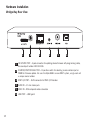
Check that the Source/Function Selector switch
setting on the back of the iBridge Bay matches the
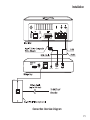
source number that the RAVD1 Decoder cables are
plugged into on the back of the controller.
Also, check the controller programming settings to
ensure that the Bay’s source command type is
“PERIPHERAL.”
Front Row exiting to iTunes unexpectedly
When a new shared library becomes available on
your network, the iBridge Bay application will exit
Front Row to refresh the available playlists. After
iTunes has updated the playlists, the Mac will return
to Front Row.
iBridge Bay Status screen shows “Bay connection status: Not Connected”
If the Bay connection status indicator is red,
the iBridge Bay Application on the Mac cannot communicate with the iBridge Bay. Please check the
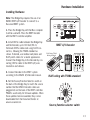
USB connection between the iBridge Bay and the
Mac computer.
If the cable appears to be connected correctly and
the problem persists, you may have a defective
cable or USB terminal.
16