1
Appendix B: Bugs and How To Report Them
167
B.5.1.1 Disabling Logging
The log files created by ddd can become quite large, so you might want to turn off logging.
There is no explicit ddd feature that allows you to do that. However, you can easily create a
symbolic link from ‘~/.ddd/log’ to ‘/dev/null’, such that logging information is lost. Enter
the following commands at the shell prompt:
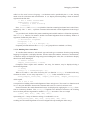
$ cd
$ rm .ddd/log
$ ln -s /dev/null .ddd/log
Be aware, though, that having logging turned off makes diagnostics much more difficult; in case
of trouble, it may be hard to reproduce the error.
B.5.2 Debugging DDD
As long as ddd is compiled with ‘-g’ (see Section 4.1 [Compiling for Debugging], page 71),
you can invoke a debugger on ddd—even ddd itself, if you wish. From within ddd, a special
‘Maintenance’ menu is provided that invokes gdb on the running ddd process. See Section 3.1.9 [Maintenance Menu], page 47, for details.
The ddd distribution comes with a ‘.gdbinit’ file that is suitable for debugging ddd.
Among others, this defines a ‘ddd’ command that sets up an environment for debugging ddd
and a ‘string’ command that lets you print the contents of ddd ‘string’ variables; just use
‘print var’ followed by ‘string’.
You can cause ddd to dump core at any time by sending it a SIGUSR1 signal. ddd resumes
execution while you can examine the core file with gdb.
When debugging ddd, it can be useful to make ddd not catch fatal errors. This can be achieved
by setting the environment variable DDD_NO_SIGNAL_HANDLERS before invoking ddd.
B.5.3 Customizing Diagnostics
You can use these additional resources to obtain diagnostics about ddd. Most of them are tied
to a particular invocation option.
appDefaultsVersion (class Version)
Resource
The version of the ddd app-defaults file. If this string does not match the version of the
current ddd executable, ddd issues a warning.
checkConfiguration (class CheckConfiguration)
Resource
If ‘on’, check the ddd environment (in particular, the X configuration), report any
possible problem causes and exit. See Section 2.1.2 [Options], page 16, for the
‘--check-configuration’ option.
dddinitVersion (class Version)
Resource
The version of the ddd executable that last wrote the ‘~/.ddd/init’ file. If this string
does not match the version of the current ddd executable, ddd issues a warning.