1
Creating projects
4.8
Copying objects: Between projects and within a project
Principle
You can cut or copy selected parts of your project and paste them via the
clipboard. For example you can copy text and fields from the alarm message
editor to the event message editor, or graphic elements from one screen to
another.
The prerequisite for successful copying between projects is that the system limits
of the destination project must not be exceeded.
Preparations for new projects
Before starting to copy objects from an existing project, you should without fail
carry out the following global settings in the new project. This will ensure that no
loss of data occurs during copying due to different settings.
•
Under the heading System → Screen / Keys make the subdivision of the
screen display the same as in the source project.
•
Make the name and driver of the PLC the same as in the source project.
Procedures
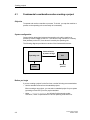
There are two ways of pasting objects from the clipboard to the destination project:
•
Menu command Edit → Paste
The object is pasted from the clipboard to the destination project. If there is
already an object of the same name in the destination project, the object is
pasted under a new name.
•
Menu command Edit → Paste Special
Only objects that are different are pasted. If there is already an identical object
of the same name in the destination project, this is used. If there is an object
that has the same name but is not identical, the object from the clipboard is
pasted under a new name. You can utilize this copying variant to make the
destination project the same as the source project, for instance.
Note
In the case of both Paste and Paste Special, ProTool always checks the underlying
objects (such as the limit value tags of a tag which has been copied) to ensure that
existing objects are reusable.
If there is already an object of the same name in the destination project, the object
to be pasted will be renamed if necessary. It is given the next available name in
the destination project.
ProTool User’s Guide
Release 12/99
4-11