1
preTee
1
General
preTee is an input wizard specifically designed for girder bridges assembled from
pre-cast pre-stressed girders which are placed adjacent to each other with an on-site
concrete topping slab. preTee supports the input of the structural system, the load
definition and the definition of a construction sequence. The structural analysis and
automated design checks are performed automatically based on the provided input
information and in accordance with the prescribed national code.
preTee functions as an integral task within the SSD (SOFiSTiK Structural Desktop)
user environment. A basic understanding of the SSD user environment will be
required for the use of the preTee wizard and the application of information
presented in the user manual.
1.1 Initial Definitions
The following information must be defined prior to launching preTee to ensure the
correct functionality:
• general project information,
• material specifications and
• cross-section information.
It is recommended that when commencing a preTee project the predefined templates
are used. This is done by choosing ‘New Project from Template…’ from the File drop
down menu in the SSD. By following the tabs to the pretee sub-directory, a template
called pretee_as5100.sofistix (for AS5100) may be found as part of the standard
installation of the preTee wizard.
Once the template is selected the user will be asked to define the name of the project
data base and the location of the directory where the database and all associated
files will be stored.
When the project is open the project tree will consist of a System Group and a
preTee ABES group. Under the System group will be found the initial definitions
including system information, materials and cross-sections. While the preTee ABES
group contains the ABES preTee task.
1.1.1 Project Information
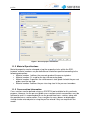
General project information is defined in the System Information Task (Figure 1). This
task is pre-set in the provided template. In this input window a number of alternative
settings are possible. While it is recommended that the title of the project be adjusted
to describe the project, adjustment of the other variables is not recommended as they
may override assumptions made by the preTee wizard.
version 2.0
4