1
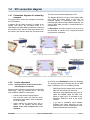
AES-3 input and output cables connect as following:
XLR
Signal
1
GND
2
AES3 (1)
3
AES3 (2)
1.2.6
Remote control
Each unit has four inputs and four outputs for remote
control. Each input can controls a switch off the remote
unit.
Inputs are type “dry inputs”. To enable an input (input
“on”) send it to a GND pin of DB-15.
AES3 standard connection
S/PDIF device can connect to AES-3 input/output of
ADA102 using an S/PDIF to AES-3 adapter.
No software setting is needed to enable AES-3. Decoded
audio are always sent to Analog and AES-3 outputs.
The output switches 1 and 2 are "open collector" type
(used for example to command external control circuit).
Switches 3 and 4 are mechanical relays that can
manage up to 1 A @ 24 VDC.
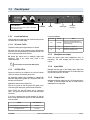
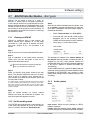
DB-15 pin out:
1.2.3
LAN port
Standard Ethernet RJ45 10/100 to connect the unit to a
switch/router to send or receive audio streaming.
1.2.4
USB port
Lets plug in a flash memory storage (Pen Drive) when
the unit works as a decoder, so that in case of loss of
streaming, the decoder switches to the Pen Drive to
continue with the audio playback. USB 1.1 compatible
devices are supported, with the following limitations:
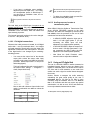
• Only mass storage devices are supported.
• HUB's are not supported (some flash drives have an internal HUB)
• 4GB is the maximum capacity. If the flash disk is larger, create a 4
GB partition. Only the first partition is supported.
• First partition mus be FAT16 format.
If your computer does not recognize the pen drive, the
following procedure can help you find the reason:
• Open an Internet browser, enter the ADA102 IP address followed
by /status (i.e.: 102.168.0.110/status).
• Scroll down until "USB device info"
• Check if "Filesystem type” is "FAT16". If it's "FAT32", reformat the
USB memory as FAT16.
The USB must contain a playlist file named
"playlist.m3u" which determines the order in which
MP3 files are played. This playlist can be created with
the Winamp audio player (www.winamp.com) or any
software that generate .m3u playlist files.
When the USB is puged, ADA102 will reboot to detect the
device, so audio output will be muted by few seconds.
1.2.5
Signal
PIN
Signal
1
Input 1
5
Switch 1 (open collector)
2
Input 2
6
Switch 2 (open collector)
3
Input 3
7 y 14
Switch 3 Relay, normal open
4
Input 4
8 y 15
Switch 4 Relay, normal open
9 a 13
GND
1.2.7
MPX output (optional ADA102mpx)
The model ADA102mpx includes a stereo coder that
generates the FM baseband signal. This output is
connected to an FM transmitter. The MPX cable is a
RG-59 (coaxial 75 ohms), like the used for CATV. The
output connector is BNC. The maximum length
recommended for this cable is 25 m. Take care with the
grounding; although this rarely is cause of problems
because all Solidyne processors have MPX differential
outputs, that is to say, with the ground isolated from the
cabinet, to avoid ground loops. If some residual
humming appears when the system is on the air; power
off ADA102. If the humming disappears, check the
input connections at the decoder. If, however, the
humming continues (and only disappears unplugging
the MPX cable), this indicates some important problem
with the grounding.
When enters to the transmitter through the MPX input,
make sure that the internal pre-emphasis network IS
DISCONNECTED (that is to say, flat response from 20
Hz to 100 KHz). Contrary, when use an external stereo
coder, make sure that the generator INCLUDES the
pre-emphasis curve. This is due that ADA102 audio
output DOES NOT INCLUDE pre-emphasis (only the
MPX output has pre-emphasis).
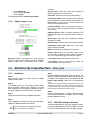
Serial port
The serial port is used to command, from the studios, a
device located in the transmitter plant as if it were
directly connected to serial port of the computer at the
Studio. For this ADA102 generates a gateway for
transporting serial data transparently through the
network (see "2.3 - Advanced Settings). The connection
requires a standard RS232 cables.
SOLIDYNE
PIN
1.2.8
Reset
Pressing this button restarts the unit. Press and hold for
10 seconds to reload the factory defaults.
If you start your computer holding down the button for 5
seconds, ADA102 starts in “firmware update” mode.
ADA102 CODER/DECODER
Page 8