1
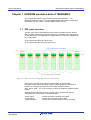
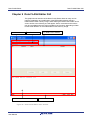
Data FLASH Editor Introduction Chapter 1 Introduction The Data FLASH Editor is a windows based tool that allows to visualize and modify the EEPROM emulation data of a Data FLASH memory image of a 78K0R or V850 based microcontroller. The Data FLASH Editor does support memory images in the Intel-hex or Motorola-S record file format. The corresponding memory image can be generated by the Data FLASH Converter or it can be uploaded from a 78K0R or V850 based In-Circuit Emulator by using the IAR, GHS or Renesas debugger. The Data FLASH Editor supports to view, modify and to save EEPROM emulation data of an existing Data FLASH memory image. In addition, the Data FLASH Editor supports to add or remove EEPROM emulation data entries to respectively from a existing Data FLASH memory image. The Data FLASH Editor does distinguish between three different 78K0R and V850 based device families and FLASH Technologies: 78K0R: MF2 FLASH Technology in combination with the 78K0R/Fx3 EEPROM emulation library EEL (Type T03) V850E/ES: UX4 and MF2 FLASH Technology in combination with the V850 EEPROM emulation library EEElib (previous Type) V850E2: UX6LF FLASH Technology in combination with the V850 EEPROM emulation library EEL (Type T05) Different to V850E/ES device family, the Data FLASH Editor needs to read or to create an XML based raw data management description file first, to support 78K0R and V850E2 devices accordingly. This is caused by the different emulation library concepts of V850E/ES and V850E2, 78K0R. By reading or creating the raw data management description file the Data FLASH Editor gets the corresponding information about the data set IDs and data set length information. Based on this information only the latest valid IDs and matched data sets of a Data FLASH memory image file will be shown as validated data sets within the Data FLASH Editor window. The remaining data sets will be shown as invalidated data sets within the editor window. R01UT0176ED0000 Rev. 1.00 User Manual 7